Gatsby & GraphQL: Nodes vs. Edges

In Brief
A GraphQL node is the record itself, whilst an edge represents that node's place in a connection and can carry relationship metadata supplied by the schema. Query nodes directly when the records are all you need; use edges when that connection data matters. Gatsby fields such as next and previous are schema‑specific, not properties that every GraphQL edge receives automatically.
Although strictly speaking this doesn't relate directly to Gatsby, it is a question that I am asked fairly frequently when it comes to developing with Gatsby. For many front‑end developers, using Gatsby will be the first time that they have been exposed to GraphQL queries.
For this example, assume a Gatsby node type named Shuttles, implementing Node, with name: String! and sequence: Int! fields. Its generated allShuttles connection contains Enterprise with sequence 1, Columbia with 2, and Challenger with 3. Sorting by sequence makes the order explicit. Here is the query using the Gatsby sort syntax available when this article was written:
query Shuttles {
  allShuttles(sort: { fields: sequence, order: ASC }) {
    edges {
      node {
        name
      }
    }
    nodes {
      name
    }
  }
}
At first glance, the result from this looks to be the same for both edges and nodes:
data: {
  allShuttles: {
    edges: [
      {
        node: {
          name: 'Enterprise',
        },
      },
      {
        node: {
          name: 'Columbia',
        },
      },
      {
        node: {
          name: 'Challenger',
        },
      },
    ],
    nodes: [
      {
        name: 'Enterprise',
      },
      {
        name: 'Columbia',
      },
      {
        name: 'Challenger',
      },
    ],
  },
},
However, there are some subtle and key differences between the two.

Graph Theory
In order to explain the difference, you need to have a very gentle grasp of Graph Theory. In the quickest and simplest way I can manage: Graph Theory describes the idea that data can be modelled by connecting circles (nodes) of data, via lines that describe the relationship between nodes (edges). Therefore, our GraphQL data looks a little like a much more complex version of this diagram:
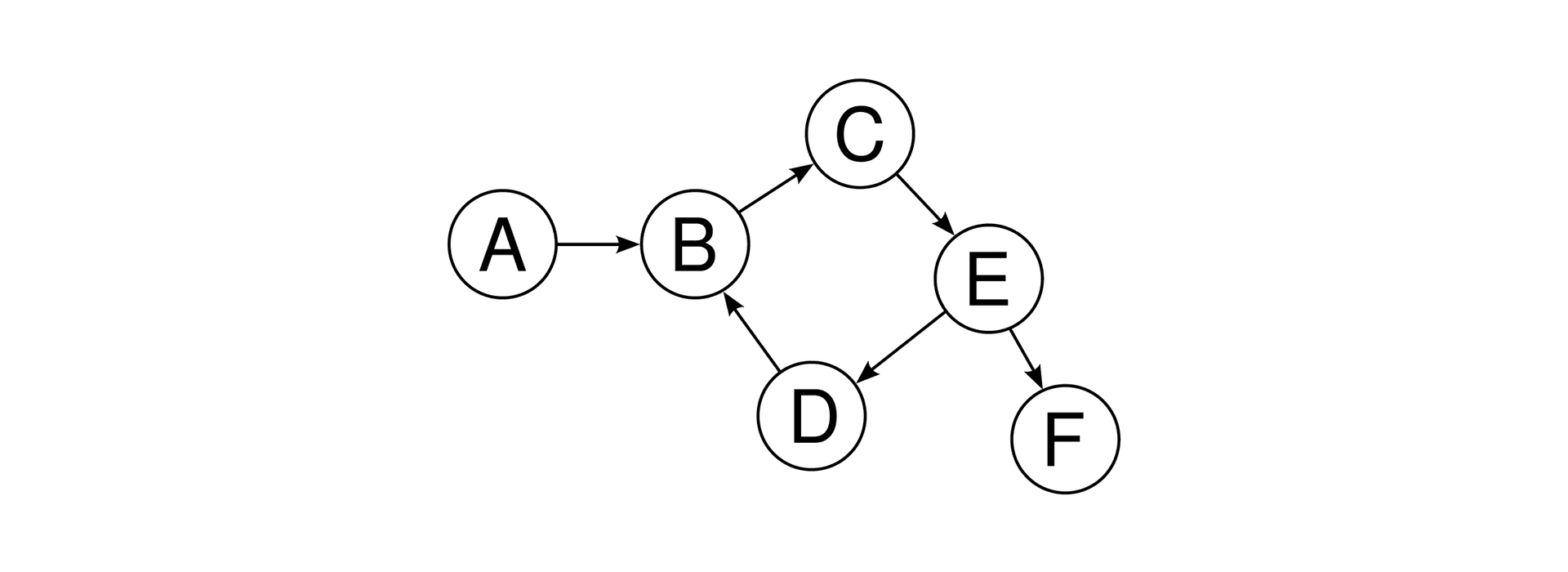
Each circle is a node, each line between them is an edge.
Nodes
In situations where you only need to access an item of data directly (without any additional data about its relationship with other nodes), then accessing them directly via node makes perfect sense: it is a shorter and more concise query, and it returns all the data you need.
Edges
On the other hand, edges also describe the relationship between those nodes. So, expanding on the original example above:
query Shuttles {
  allShuttles(sort: { fields: sequence, order: ASC }) {
    edges {
      node {
        name
      }
      next {
        name
      }
      previous {
        name
      }
    }
  }
}
Results in:
data: {
  allShuttles: {
    edges: [
      {
        node: {
          name: 'Enterprise',
        },
        next: {
          name: 'Columbia',
        },
        previous: null,
      },
      {
        node: {
          name: 'Columbia',
        },
        next: {
          name: 'Challenger',
        },
        previous: {
          name: 'Enterprise',
        },
      },
      {
        node: {
          name: 'Challenger',
        },
        next: null,
        previous: {
          name: 'Columbia',
        },
      },
    ],
  },
},
The edges now include the neighbouring records in the selected order. The first edge has previous: null, and the last has next: null, because there is no record on that side. A neighbouring object with name: null would mean something different: an existing record whose name is missing.
Pagination in Gatsby Using Edges
Pagination in Gatsby itself is definitely something for another time and another article, but to give some brief context: in the case of developing within Gatsby, the most common use‑case for edge queries is going to be building up pagination between pieces of data. For example, blog articles.
In this Gatsby implementation I use the neighbouring records for the next article and for the next project beneath each portfolio item. The edge fields can be passed into pageContext from gatsby-node.js. A sorted nodes array can also provide neighbours by index; the edge shape simply supplies those relationships alongside each record.
The Difference in a Nutshell
All of this is a lot of words (and excuses to post pictures of Space Shuttles) to say in a nutshell: the difference is that a node is a specific piece of data whereas edge allows you to access and use the relationship between that data and others as well.
Use a node query if you just want the data. Use an edge query if you want to know more about the data's relationship with other pieces of data in your schema.
Postscript
June 2026: The site reference above describes my former Gatsby implementation from April 2022; the site now uses Next.js. The distinction between records and schema‑defined connection metadata remains useful, but the Gatsby page‑creation and next‑item wiring described here belongs to that older implementation.