Vue 3 Composition API: Practical Patterns and Pitfalls

A ticket filter starts out innocently enough: one search box, a list, and a few lines of filtering. Then the toolbar needs the same query. Another screen needs the same behaviour. Eventually the list comes from a request, and yesterday's search finishes after today's.
The Vue 3 Composition API gives us functions for reactive state, derived values, and lifecycle behaviour. The difficult part is deciding which instance owns that state, what stays reactive across a function boundary, and when old work must stop being allowed to update the screen.
This assumes you're comfortable with Vue templates, props, and basic TypeScript; the Composition API introduction covers the starting point. We'll follow a typed ticket queue through state ownership, reactive boundaries, and request cleanup using Vue 3.5 or later. Each change solves a particular requirement; we don't need all of them for every filter.
Start with State the Component Owns
Our ticket model and matching rule are ordinary TypeScript. Put these in tickets.mts (a TypeScript ES module):
export type Ticket = {
  id: number;
  subject: string;
};

export function filterTickets(
  tickets: readonly Ticket[],
  query: string,
): readonly Ticket[] {
  const term = query.trim().toLowerCase();
  return tickets.filter((ticket) => ticket.subject.toLowerCase().includes(term));
}
The rule trims the query and matches subjects without case sensitivity. It doesn't know about Vue, request state, or the screen. A plain function is enough.
Now give one component its own query:
<script setup lang="ts">
import { computed, ref } from 'vue';
import { filterTickets } from './tickets.mts';
import type { Ticket } from './tickets.mts';

const props = defineProps<{ tickets: readonly Ticket[] }>();
const query = ref('');
const matchingTickets = computed(() => filterTickets(props.tickets, query.value));
</script>

<template>
  <label>
    Filter tickets
    <input v-model="query" type="search" />
  </label>
  <ul>
    <li v-for="ticket in matchingTickets" :key="ticket.id">
      {{ ticket.subject }}
    </li>
  </ul>
</template>
ref('') infers a string ref. In script, query.value reads its value; the template unwraps these top‑level refs, so v-model="query" works without .value. The typed prop tells the component what it receives. It doesn't validate a server response at runtime.
matchingTickets is derived from two inputs. A computed getter tracks both and caches its result until a dependency changes. A watcher that copies the filtered list into another ref would give us two pieces of state to keep consistent. There's no need for that extra job.
This is still a small component. Keep it here until there's a reason to move it.
What Changes with the Options API?
The same template works with this Options API script:
<script lang="ts">
import { defineComponent } from 'vue';
import type { PropType } from 'vue';
import { filterTickets } from './tickets.mts';
import type { Ticket } from './tickets.mts';

export default defineComponent({
  props: {
    tickets: { type: Array as PropType<readonly Ticket[]>, required: true },
  },
  data() {
    return { query: '' };
  },
  computed: {
    matchingTickets() {
      return filterTickets(this.tickets, this.query);
    },
  },
});
</script>
Both implementations use Vue's reactivity, and both express the same behaviour. The Options version groups code by data and computed; the Composition version keeps the query and its derivation together as variables. When a feature also has requests, validation, and cleanup, that grouping becomes more useful.
There isn't a meaningful performance claim to make from this small comparison. Vue's Composition API FAQ also makes clear that the Options API is staying. I wouldn't rewrite a settled component just to change the shape of its script.
In an existing application, introduce a composable through setup() and return its refs to the template, or use <script setup> in the next component that needs substantial work. Options methods can access values returned from setup() through this; setup() cannot read Options state through this. Keep the ownership clear during that transition.
Ref vs. Reactive: Keep the Connection Intact
A ref is a useful default for values that may be replaced: a query string, a selected ticket, or a new result array. reactive() gives us a proxy around an object, which can be convenient for related form fields. Vue's reactivity fundamentals recommend refs as the primary state API because reactive objects have a few awkward boundaries.
Destructuring a primitive property from a reactive object copies its current value. It doesn't carry the connection to the proxy with it. If we destructure a query string and later assign to the original object's query, the detached string doesn't update.
Use toRef(state, 'query') when a consumer needs one live property, or toRefs(state) when it needs several. Those refs remain connected to the original object. Replacing that object with an unrelated proxy doesn't retarget them. This is different from assigning a new array to a ref's .value, which is a reactive update.
Unwrapping has boundaries too. Deep reactive object properties unwrap refs, but refs inside reactive arrays or a Map still need .value. In templates, the convenient general rule applies to top‑level render‑context refs, not every ref buried in an arbitrary object. Keep the exposed shape simple and the template becomes easier to read.
Vue 3.5 adds one especially easy source of confusion: destructured defineProps() bindings are reactive within the same <script setup> block because the compiler rewrites their accesses. That isn't a change to JavaScript destructuring generally. Passing a destructured prop to another function still passes its current value. Pass a getter when that function needs to observe later changes. Vue's props guide explains the version boundary.
Extract Behaviour Without Accidentally Sharing State
Suppose a second ticket list needs the same filtering. We can extract the reactive part into useTicketFilter.mts:
import { computed, ref } from 'vue';
import { filterTickets } from './tickets.mts';
import type { Ticket } from './tickets.mts';

export function useTicketFilter(tickets: () => readonly Ticket[]) {
  const query = ref('');
  const matchingTickets = computed(() => filterTickets(tickets(), query.value));

  return { query, matchingTickets };
}
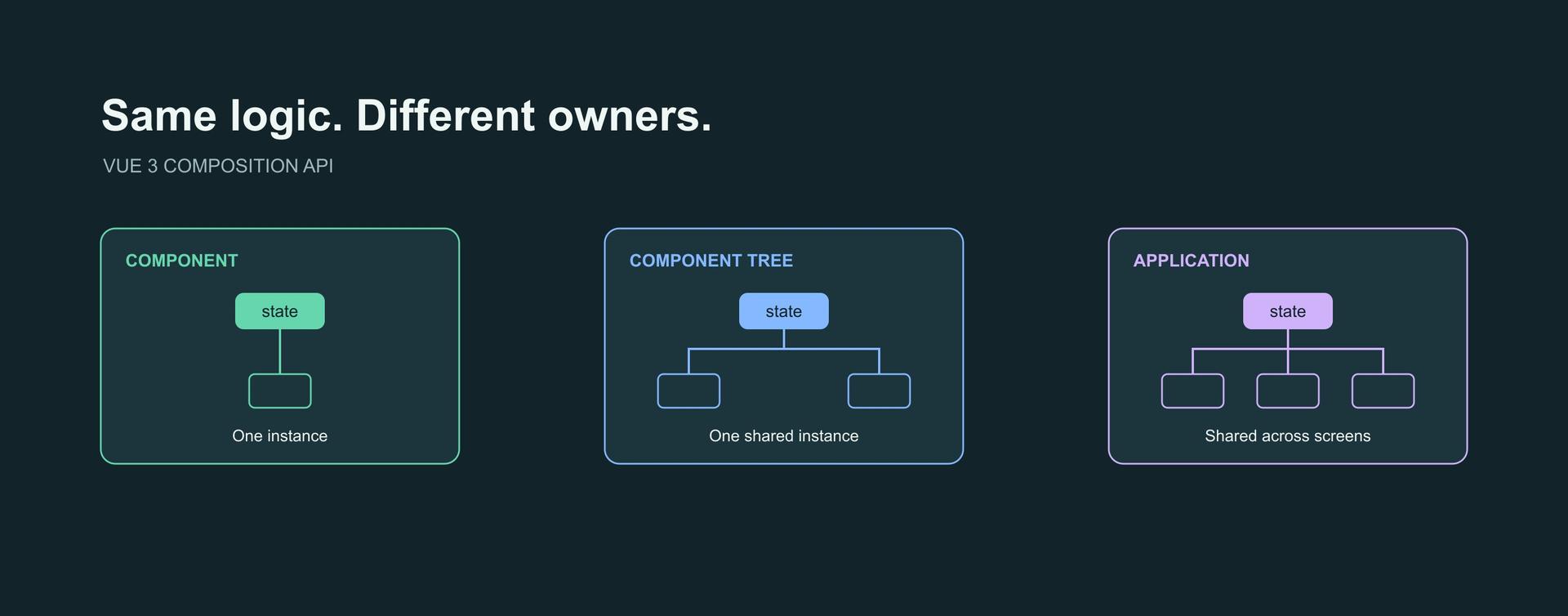
The use prefix identifies a composable: a function that uses Vue's Composition API to package stateful logic. Calling it twice creates two queries because ref('') runs inside each call. Sharing the function does not share its state.
In the original component, import useTicketFilter and replace the local query and computed declaration with const { query, matchingTickets } = useTicketFilter(() => props.tickets). The getter reads the current prop whenever the computed value runs. If this composable accepted a plain array instead of a getter, it would capture the current array and miss a later replacement.
The returned object contains refs, so destructuring it preserves their reactive identity. This is the return convention recommended in Vue's composables guide. We haven't wrapped the return value in another reactive object, and consumers don't have to guess which properties are live.
There's still a cost: readers now open another file to understand three lines of reactive behaviour. Extracting it earns its place when the rule is reused or becomes substantial enough to deserve a named boundary. It doesn't earn its place merely because we can.
For a different kind of reuse, my custom composable article uses outside‑click handling, where browser events and lifecycle cleanup are the main concerns.
Share an Instance When the Screen Needs One
A filter toolbar and result count in the same queue should agree on the query. If they each call useTicketFilter, they won't. We need one instance owned by their parent.
Props and emitted events are a good starting point for nearby components. For a deeper tree, a typed provider makes the scope explicit:
import { inject, provide, readonly } from 'vue';
import type { InjectionKey } from 'vue';
import type { Ticket } from './tickets.mts';
import { useTicketFilter } from './useTicketFilter.mts';

function createTicketFilter(tickets: () => readonly Ticket[]) {
  const { query, matchingTickets } = useTicketFilter(tickets);
  return {
    query: readonly(query),
    matchingTickets,
    setQuery(value: string) {
      query.value = value;
    },
  };
}

const ticketFilterKey: InjectionKey<ReturnType<typeof createTicketFilter>> =
  Symbol('ticketFilter');

export function provideTicketFilter(tickets: () => readonly Ticket[]) {
  provide(ticketFilterKey, createTicketFilter(tickets));
}

export function useProvidedTicketFilter() {
  const filter = inject(ticketFilterKey);
  if (!filter) throw new Error('Missing ticket filter provider');
  return filter;
}
Call provideTicketFilter(() => props.tickets) in the parent component's setup. Descendants call useProvidedTicketFilter(), read query and matchingTickets, and send changes through setQuery. The read‑only query stops consumers casually writing around that small interface. Missing a provider fails explicitly rather than quietly creating a second, disconnected filter.
Each provider creates its own state. A second queue elsewhere can have a different query without either tree knowing about the other. My provide/inject guide covers that boundary in more detail.
Moving the ref to module scope would also share it, but with a different lifetime: every consumer of that module would reach the same instance. That can be intentional for browser‑only application state. It is usually a surprising home for a route's temporary filter, and it becomes dangerous for user‑specific server state.
When Pinia Becomes Worth It
If the queue must survive route changes, coordinate edits from multiple screens, or expose state through store tooling, Pinia gives it an explicit application‑level home:
import { defineStore } from 'pinia';
import { ref } from 'vue';
import type { Ticket } from './tickets.mts';
import { useTicketFilter } from './useTicketFilter.mts';

export const useTicketQueueStore = defineStore('ticketQueue', () => {
  const tickets = ref<readonly Ticket[]>([]);
  const { query, matchingTickets } = useTicketFilter(() => tickets.value);

  return { tickets, query, matchingTickets };
});
This reuses the filtering behaviour whilst moving ownership to the store. Register Pinia with the application using createPinia() and app.use(pinia) before consuming the store. Within that Pinia instance, consumers of this store share the query and tickets.
Read store.query directly, or use storeToRefs(store) when destructuring reactive state and getters. Destructuring the store's unwrapped query into a plain string has the same basic problem as destructuring a reactive object.
A store adds a dependency and a wider lifetime. It doesn't make our matching rule better, and it doesn't persist data across reloads without a separate persistence decision. Local state, a per‑call composable, and a provided instance all remain useful. State Management in Vue: Vuex vs. Pinia discusses when a store is justified and when an existing Vuex application can sensibly stay as it is.
If the filter should be bookmarkable, the URL may be its proper owner. Avoid letting a route query and a store query become competing authorities. The Vue Router article discusses that wider routing context.
Requests Need Invalidation, Not Just a Watcher
Client‑side filtering stops being enough when the server owns the search. Now a change to the query must start work outside Vue. That's a side effect, so a watcher is appropriate.
We'll inject the request function rather than hiding a particular endpoint inside the composable. TicketLoader accepts a query and an abort signal and resolves to validated tickets. Its implementation should check unsuccessful HTTP responses and validate the response shape; a TypeScript assertion alone cannot do either.
import { ref, watch } from 'vue';
import type { Ticket } from './tickets.mts';

export type TicketLoader = (
  query: string,
  signal: AbortSignal,
) => Promise<readonly Ticket[]>;

export function useTicketSearch(query: () => string, loadTickets: TicketLoader) {
  const tickets = ref<readonly Ticket[]>([]);
  const loading = ref(false);
  const error = ref<string | null>(null);

  watch(query, async (term, _previousTerm, onCleanup) => {
    const controller = new AbortController();
    const { signal } = controller;
    onCleanup(() => controller.abort());

    loading.value = true;
    error.value = null;

    try {
      const result = await loadTickets(term, signal);
      if (!signal.aborted) tickets.value = result;
    } catch (cause) {
      if (!signal.aborted) {
        error.value = cause instanceof Error ? cause.message : 'Could not load tickets.';
      }
    } finally {
      if (!signal.aborted) loading.value = false;
    }
  }, { immediate: true, flush: 'sync' });

  return { tickets, loading, error };
}
Call useTicketSearch(() => query.value, loadTickets) synchronously during component setup, passing a getter for the query and a loader. For this small search feature, I prefer watch because it names the input that triggers a request. Reads of other refs inside the callback won't silently become dependencies.
watchEffect is useful when automatic dependency collection makes the relationship clearer, but it only tracks reads made during synchronous execution. In an async effect, dependencies first read after await aren't collected. Neither API turns an async response into a safe state update automatically.
The cleanup callback aborts the old request when the query changes or the watcher stops. We register it before starting asynchronous work. The callback‑provided onCleanup works here; the separate onWatcherCleanup API added in Vue 3.5 must be called before any await. These details are documented in Vue's watcher guide.
Aborting alone isn't the complete guarantee. An injected loader might ignore the signal, or do work that can't be cancelled. After the request settles, success, error, and loading‑state writes check that its signal is still active. An old request's finally must not turn off the loading indicator for a newer request.
This example deliberately uses flush: 'sync' for a single string source, so changing the query invalidates its old request immediately. Sync watchers aren't batched; don't copy that choice onto an array being changed hundreds of times. Nor does it debounce keystrokes. If request volume matters, debounce the query before it reaches this boundary and clean up the timer too.
The composable retains the previous results whilst loading and after a failure. A consuming component must label that stale display, show loading and error states, and avoid presenting it as a fresh result. Clearing results is another valid product choice. Cancellation and presentation are separate decisions.
Test the Failure, Not Just the Happy Path
The extracted filter can be tested without mounting a component. Change its query, replace its input, and inspect the computed output. A second call should keep its own query. Those assertions tell us something useful about ownership.
Async work needs a less polite test. Resolve the newer request first, then let the older one finish even though its signal has been aborted:
import { flushPromises } from '@vue/test-utils';
import { expect, it } from 'vitest';
import { effectScope, ref } from 'vue';
import type { Ticket } from './examples/tickets.mts';
import { useTicketSearch } from './examples/useTicketSearch.mts';
import type { TicketLoader } from './examples/useTicketSearch.mts';

it('keeps newer tickets when an aborted request resolves late', async () => {
  const query = ref('login');
  const requests: Array<{
    signal: AbortSignal;
    resolve: (tickets: readonly Ticket[]) => void;
  }> = [];
  const loadTickets: TicketLoader = (_query, signal) =>
    new Promise((resolve) => requests.push({ signal, resolve }));
  const scope = effectScope();

  try {
    const { tickets } = scope.run(() => useTicketSearch(() => query.value, loadTickets))!;
    query.value = 'refund';
    expect(requests[0].signal.aborted).toBe(true);

    const newer = [{ id: 2, subject: 'Refund still pending' }];
    requests[1].resolve(newer);
    await flushPromises();
    expect(tickets.value).toEqual(newer);

    requests[0].resolve([{ id: 1, subject: 'Cannot log in' }]);
    await flushPromises();
    expect(tickets.value).toEqual(newer);
  } finally {
    scope.stop();
  }

  expect(requests[1].signal.aborted).toBe(true);
  query.value = 'delivery';
  expect(requests).toHaveLength(2);
});
The scope wraps only synchronous watcher creation; the asynchronous assertions run outside it. Stopping the scope aborts the current request and prevents the watcher reacting again. The loader deliberately ignores cancellation. If the stale response can still update the tickets, the test fails. A companion case should reject the old request whilst a new one is loading, verifying that neither the error nor loading state changes. Unmount a small host component to verify lifecycle cleanup, rather than assuming a standalone function test proves it.
The downloadable verification harness exercises these cases with Vitest and Vue Test Utils, checks both component styles, and type‑checks the Vue single‑file components. My Vue component testing guide covers the broader distinction between testing behaviour directly and testing it through rendered controls.
Create the watcher synchronously in setup so Vue can stop it when the component unmounts. Creating one later inside a timer or unrelated async callback loses that automatic ownership. Outside a component, an explicitly managed effect scope can own and dispose of it.
SSR Changes the Lifetime of Shared State
On the server, module scope can outlive an individual request. A module‑level ref holding one user's tickets can therefore be read by another request. This is cross‑request state pollution, not a theoretical distinction about where we put a declaration.
Create the application and its Pinia instance per request, and create provided state inside that application's component tree. A module‑level store definition is fine; the state instances it creates must belong to the correct request. Follow Pinia's SSR guidance for explicit instances outside setup and safe hydration of serialised state.
The search composable is a client‑interaction example. With its immediate: true and flush: 'sync' options, server‑side setup creates the watcher and starts the request. Vue's server renderer doesn't wait for the asynchronous callback to finish before rendering the component. When rendering finishes, it stops the watcher, triggering cleanup and aborting any request still pending. Watcher creation, callback execution, and awaiting data are different things; other watcher options don't all behave this way.
For an SSR application, keep the refs in setup but move the watch() registration into onMounted, or place the search UI in a client‑only component. Initial server data belongs in the framework's loading mechanism or onServerPrefetch, whose promise the renderer awaits. My Vue SSR article covers the wider rendering decision.
Wrapping Up
The useful question isn't how many composables a component contains. It's whether we can follow a value from its owner, through its consumers, to the point where its lifetime ends.
For this queue, a ref and a computed value are enough until requirements say otherwise. Extraction shares behaviour. A provider shares an instance within a tree. A store gives that state an application‑level home. None of those choices excuses us from keeping reactive inputs connected or preventing obsolete requests from writing over current results.
That's where the Composition API earns its flexibility: we can make those boundaries explicit without pretending every feature needs the same architecture.