HSBC Corporate
Banking
Lead UI developer for HSBC digital transformation initiatives, including the ground‑up rebuild of HSBCnet's commercial banking application using React, TypeScript, Node.js, and AEM.

In Detail
HSBCnet's corporate banking transformation went through several research, prototyping, and proof‑of‑concept stages before the main delivery phase began. I joined during that early research phase, developing and validating prototypes, then moved into a lead UI role as the programme progressed into full delivery.
I led a small team of UI developers responsible for the front‑end architecture of the new commercial banking application. The wider programme grew into one of HSBC's largest digital transformation initiatives, involving thousands of people across engineering and related workstreams.
The final product rebuilt the commercial banking application from the middle tier upwards. A new middle tier combining Java and Node.js bridged legacy back‑end services into a responsive React application built with Redux, TypeScript, HTML5, Less, and BEM.
AEM remained part of the architecture, but its role shifted towards headless content management and internationalisation. The front end therefore had to bring together complex banking workflows, legacy system constraints, content‑managed copy, and multi‑market requirements within a coherent application experience.
This was a hands‑on leadership role. I was directly accountable for UI team output, code quality, peer review, pair programming, and mentoring. We established shared engineering standards through pre‑commit linting, the Airbnb JavaScript Style Guide, Jasmine test coverage, and a Storybook component library used to document and share components across teams.
Accessibility was a critical success measure. Many HSBCnet users spend large parts of their working day inside the platform, so the interface needed to reduce friction, support sustained use, and make complex commercial banking workflows easier to navigate, whilst working towards AAA compliance.
As the project moved into ongoing operation, I spent two months onboarding the offshore maintenance team and supporting the transition into long‑term ownership. I later worked on a standalone React Native banking application before supporting development on HSBC's internal Loans and Trading platform.
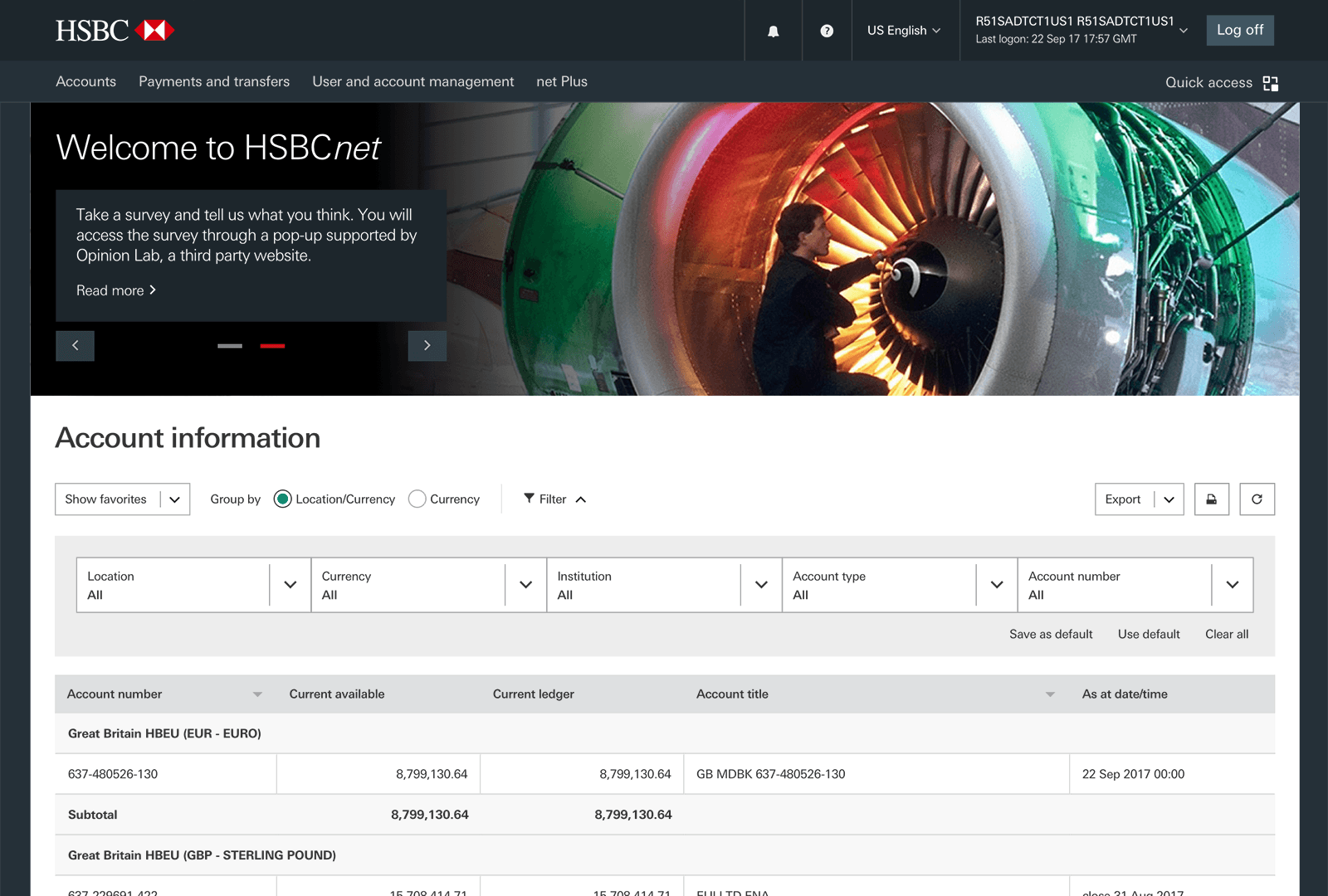
Accounts Overview Screen
The accounts overview presented key account balances immediately after login. Because commercial banking interfaces are inherently data‑heavy, accounts were grouped by currency, with filtering, sorting, and persisted preferences helping users quickly return to the information and working view they needed.


Account Transactions Screen
Commercial banking screens need to expose a large number of tasks and tools without overwhelming the primary workflow. The Account Transactions screen surfaced key transaction details at a glance, with more complex actions and information available through transaction‑specific drawers.


PDF Statement Generation
Statement and report generation had historically caused friction for users. The tool we developed let customers configure and reorder the data they needed, preview the statement within the application, then export it as a fully branded PDF or request a physical copy by post.


- "
I initially worked with John Kavanagh at Style.com where we built an e‑commerce site for Condé Nast. We built numerous versions of the site for prototypal purposes and finally went live with a version that contained the majority of work from John and his team. Always punctual, proactive and willing, he's definitely one to have in any development team. Since then we went on to work together again at HSBC where we built a number of key React components. He's a great team player who takes a lot of pride in his work, I'd highly recommend him."
- "
John Kavanagh was a real asset for the project. Not only did he quickly pick up the different frameworks used in the programme but his attention to detail and proactive approach were key for challenging deadlines and changing requirements."
- "
John Kavanagh was undoubtedly the best UI developer on the programme (often carrying the burden of his team) and played a crucial role in rebuilding the look and feel of the bank's global online platforms. John was always articulate, willing to speak his mind, helpful and always did an amazing job ‑ he clearly takes immense pride in his work (and rightly so!). His attention to detail and perfectionist attitude helped produce a product that we could be proud of, despite the extremely difficult environment we had to work in.
John would suit any senior or lead UI developer roles and I would have no hesitation in recommending him."