Introducing Seeded Randomisation into an SSR Gatsby Project

One of the more recent topics of discussion with my airline client has been around the equal prioritisation of content, and how we can avoid an excessively long and large page whilst still giving items of content equal billing on their homepage.
In this instance, we're talking specifically about the different destinations that the airline flies to. Attempting to find a way to display information for more than a dozen locations at once without overloading the user or resulting in a chaotic mess of content is difficult. This is made doubly so when, in reality, the content creators actually want to display more than thirty or forty locations at once.
The interim solution, for now, has been a carousel (even though I'm not at all a fan of carousels), which allows the content creators free rein to include or exclude as many items as they wish, safe in the knowledge that they are all there and accessible for everyone:
An Argument for Randomisation
There is an alternative, though, and it's something I have been a bit of a fan and advocate of for a very long time: randomisation.
In the dynamic world of web development, randomised content serves as a way to present different items to your users fairly and equally. I spent much too much time finding ways to introduce randomisation into one of the previous versions of my portfolio simply to add a level of novelty to what was otherwise a fairly mundane grid. What it did mean ‑ however ‑ is that a visitor would be just as likely to be presented with the work I did for the London 2012 Olympics in that key top‑left corner as they were to see my work with the Christian festival Rock Nations in that top spot. The reason for doing this is fairer exposure, rather than a promise of better search rankings.
This is something that I carry on across my personal (and client) projects even now; the order of the projects that flicker past your eye as you first load my homepage is random, as are the featured case studies a few scrolls downwards.
By finding ways to introduce randomness into your website, you add an element of interest that keeps the experience fresh and engaging, encouraging and driving user exploration deeper into the site whilst ensuring a balanced exposure of all content.
The Challenge: Randomisation in SSR
This is all well and good, but when it comes to developing an application or website that relies on Server‑Side Rendering (SSR), randomisation poses a significant problem and a unique set of challenges. At their core, traditional client‑side randomisation methods such as Math.random() can produce different values on the server and in the browser. They are unsuitable for content that must match during hydration unless the result or its seed is computed once and serialised.
When Gatsby statically builds a page, it pre‑renders the page into HTML. A Gatsby page that exports getServerData is instead rendered for each request. In either model, calling the random‑number generator independently during the initial HTML render and client hydration can produce different content.
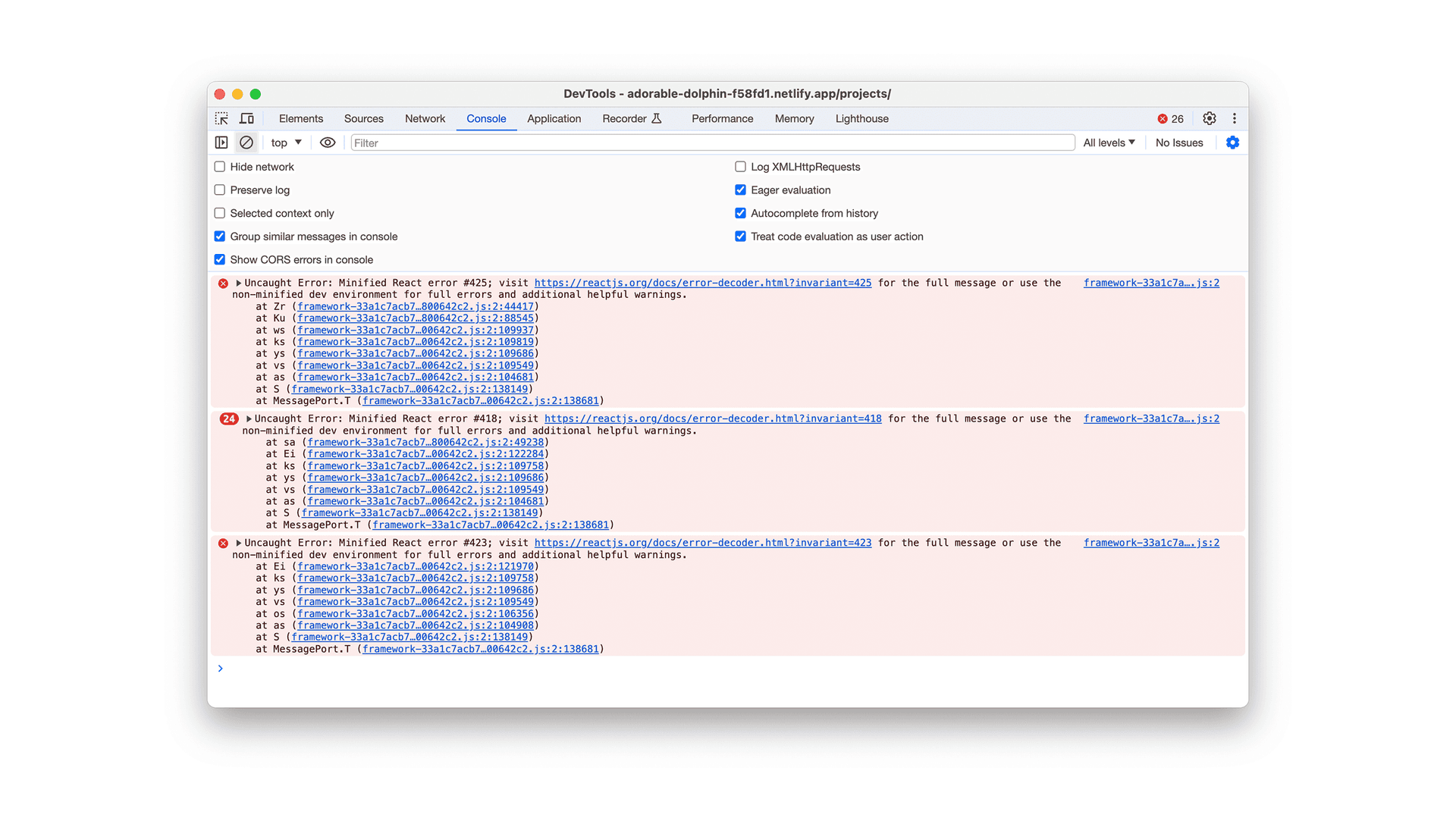
This leads to hydration errors and a phenomenon known as a "mismatch".
The Importance of Consistent Rendering
This mismatch between server‑rendered and client‑rendered content can be more than just a cosmetic issue; it can lead to a jarring user experience as elements appear to change abruptly on the page during client‑side rendering. At worst, this leads to the entire page being painted by the browser for a second time as part of the hydration process. At best, this is inelegant.
The immediate problem is that the browser and server disagree about what belongs on the page. That's enough reason to fix it, without assuming a particular effect on search rankings.
The Challenge
So, the challenge is to introduce randomisation into a website but in a way that is consistent and predictable across both the server and client sides. The goal is to have the server and the client render the same randomised content for each user visit, each time.
Really, the challenge is to find a predictable, consistent, and non‑random way of making things look random...
As you might appreciate, this is the exact opposite of the very definition of 'random', but it can still result in something extremely similar.
The Solution: Seed‑Based Pseudorandomness
Embracing Determinism
The key to reconciling randomisation with the deterministic nature of Server‑Side Rendering lies in a concept known as seed‑based randomisation (and I use the term 'randomisation' loosely from here on out).
Traditional random number generators produce completely unpredictable results (although even Math.random() isn't truly random), whereas using a seed‑based approach means we can generate random numbers that are predictable and repeatable when provided with the same initial 'seed'.
The Power of Using Dates as Seeds
The issue when it comes to SSR versus client‑side is finding a stable seed, which is where using the date comes in...
By capturing the current date once on the server and serialising its seed with the rendered page, we can ensure that the browser uses exactly the same seed during hydration. The seed may change daily, monthly or hourly, but it must not be recalculated independently on each side.
As an example, formatting the current date as YYYYMMDD provides a daily‑changing seed, so although your content may remain in the same 'random' order for the day (arguably, this is preferable from a usability perspective anyway), anybody revisiting your application the next or another day will be presented with an all‑new ordering and hopefully some fresh content that they did not see the day before.
Using this approach, where we align the 'randomish' outputs from both the server‑side and client‑side, we can start to address the core issue in SSR‑mismatch. Quite simply: that they need to output the same thing...
Practical Applications and Flexibility
The beauty of this solution is its flexibility. Depending on your specific need, the seed can be adjusted to change more frequently (e.g., hourly) or less frequently (e.g., weekly), allowing precise control over how often the randomised content changes.
This makes seed‑based randomisation using dates a powerful tool if you want to add a dynamic yet consistent element to your Gatsby/SSR project.
Step‑by‑Step Implementation
Integrating seed‑based randomisation into a Gatsby project is relatively straightforward and can be accomplished with native JavaScript, allowing you to develop a reusable utility function that can be imported and used across your application.
I should say here that whilst there are also libraries like seedrandom available for more complex needs, most of the time this is simply going to import way more weight to your project than is necessary. A basic implementation can be done without third‑party dependencies.
Creating a Seed‑Based Randomisation Function
1. Generating a Date‑Based Seed:
The first step is creating a function that turns a supplied date into a seed. Passing the date in matters: the server can capture time once and use the same instant for the seed and its cache boundary. UTC avoids local‑time‑zone differences:
const getUtcDateSeed = (date: Date): number => {
  const seedString =
    date.getUTCFullYear().toString() +
    (date.getUTCMonth() + 1).toString().padStart(2, '0') +
    date.getUTCDate().toString().padStart(2, '0');
  return parseInt(seedString, 10);
};
Here, we're generating a date‑based number based on the current (UTC) date in the format YYYYMMDD. We can then use this number as a seed for our pseudorandomisation.
2. Implementing a Basic Seed‑Based Random Generator:
Once we have our seed, we need to create a simple random number generator function. Here's a basic implementation:
const seededRandom = (seed: number): (() => number) => {
  let state = (seed >>> 0) || 1;

  return () => {
    state ^= state << 13;
    state ^= state >>> 17;
    state ^= state << 5;
    return (state >>> 0) / 4294967296;
  };
};
Here, we're generating a pseudo‑random number greater than or equal to 0 and less than 1. The returned function advances through a repeatable sequence; a new generator created with the same seed produces the same sequence in the same order.
This is xorshift32: it mixes a 32‑bit state using shifts and exclusive OR. JavaScript defines those integer operations consistently, so we don't depend on small differences in how engines approximate a function like Math.sin().
The shift amounts, 13, 17 and 5, belong to the algorithm; they aren't numbers to swap out at random. Keep them fixed and use the seed to choose the starting point.
The unsigned conversion keeps the result positive before we divide by 4294967296. A zero seed falls back to 1 because an all‑zero xorshift state would never change. This is useful for varying content order, but it isn't a secure way to generate passwords or tokens.
3. Using It in Your Project
It may well be that you only ever want to generate random(ish) values based off the date, so having these as two separate functions may be a little irrelevant for your use case. I tend to prefer to keep them separate like this, though, simply because it allows a little more flexibility.
For a server‑rendered Gatsby page, capture the date once in getServerData, return the seed as serialisable server data, and derive the cache lifetime from that same instant. The page then creates and invokes the generator from the serialised seed:
type PageProps = {
  serverData: {
    seed: number;
  };
};

const getSecondsUntilNextUtcDay = (date: Date): number => {
  const nextUtcDay = Date.UTC(
    date.getUTCFullYear(),
    date.getUTCMonth(),
    date.getUTCDate() + 1,
  );
  return Math.ceil((nextUtcDay - date.getTime()) / 1000);
};

export const getServerData = () => {
  const now = new Date();
  const seed = getUtcDateSeed(now);
  const maxAge = getSecondsUntilNextUtcDay(now);

  return {
    props: { seed },
    headers: {
      'Cache-Control': `public, max-age=0, s-maxage=${maxAge}`,
    },
  };
};

const Page = ({ serverData: { seed } }: PageProps) => {
  const random = seededRandom(seed);
  const randomNumber = random();

  return <p>{randomNumber}</p>;
};

export default Page;
Gatsby includes the returned serverData in the rendered response and makes it available to the page during hydration. Calling random() invokes the generator; retaining seededRandom(seed) without that final call would return the generator function rather than a random value.
Optional: Using Third‑Party Libraries
I touched on this a little further up the page here, but if you have particularly complex randomisation requirements, you might also consider using a third‑party library like seedrandom. These types of libraries can offer more advanced features and better statistical randomness. However, for most use cases, the above method is more than enough.
Advanced Tips
Aligning Cache with Seed Change Frequency
One of the more nuanced aspects of implementing seed‑based randomisation, especially when using dates as seeds, is aligning this approach with your website's caching strategy. Caching can inadvertently lead to inconsistencies if not properly aligned with the seed change frequency.
Daily Seed Change:
If your seed changes daily (using aYYYYMMDDformat for example), calculate the shared‑cache lifetime from the same captured server time and expire it at the next UTC day. Do not allow cached HTML or its serialised data to cross the seed boundary.Custom Seed Frequencies:
If you're using a custom frequency (e.g., changing the seed every hour or week), adjust your caching strategy accordingly. This ensures that users always receive the most current version of randomised content as per the seed schedule.
For a statically generated Gatsby page, this also means rebuilding when the seed period changes. I tend to use a repeating cron job to kick off a new build just past midnight every day. A genuinely server‑rendered page can instead return a bounded cache header as in the example above.
Handling Client‑Side Randomisation Post‑Load
Whilst seed‑based randomisation is excellent for initial page loads, you might also want to introduce randomness in client‑side interactions after the page has loaded. This can be achieved through additional JavaScript that runs in the browser, independent of the server‑side seed.
Event‑Triggered Randomisation:
Implement randomisation on client‑triggered events like clicks, scrolls, or page interactions. Since these events occur post‑load, they won't conflict with the server‑side rendered content. You can use standardMath.random()for these purposes, as the need for SSR consistency does not apply here.Periodic Content Updates:
For dynamic content that updates regularly (like news feeds or social media posts), you can use client‑side JavaScript to fetch and display new content at set intervals. This can also be randomised using client‑side seeds or simplyMath.random(), adding a layer of dynamism to the user experience.User‑Specific Randomisation:
Consider incorporating user‑specific elements (like time of day or user preferences) in your client‑side randomisation logic. This can make the user experience more personalised and engaging.
Wrapping Up
Using randomness in your Gatsby projects needn't lead to hydration issues. A seed computed once for the rendered response and serialised for hydration can offer a blend of dynamism and consistency whilst maintaining the integrity of server‑side rendering.
This approach solves the challenge of displaying randomised content predictably, ensuring that all users experience the same version of the site at any given moment, despite the underlying randomness.
Using a date‑based seed, particularly with adjustments for time zones and cache alignment, ensures that the content remains consistent across various user visits.
As with any web development technique, the real potential of seed‑based randomisation really only comes to the surface through experimentation; my project needs and yours may differ wildly, but with each project presenting unique challenges and opportunities, they also present the opportunity to use randomisation in this way.