Reducing Headless CMS Image Bandwidth with a Storage Mirror

CMS bandwidth can get expensive very quickly. On a free plan with a hard limit, you can't simply pay for a few extra gigabytes and carry on. Running out can interrupt the website itself. Fresh content requests can fail, builds can stop, and any images whose source becomes unavailable may stop loading as caches miss or expire. Even a short interruption can cause serious problems for a business that relies on its website.
The allowance can seem generous when you're choosing a CMS. It feels rather different when you're serving a large image library to a busy website, with several responsive versions of each image in circulation.
I used an image processing and caching layer on the IMG Licensing website, where an image‑led design and high visitor numbers made bandwidth a substantial consideration. This website uses the same general approach, with Contentful supplying the assets and Vercel Blob holding the copies used for delivery. I'll use this site's implementation to explain the details.
The idea is straightforward: synchronise new and changed images into storage you control, then make that storage the source for your website's image delivery. The CMS still manages the content. Repeated image requests no longer need to keep returning to it.
Understand What's Happening
There are two transfers worth separating. One is the optimised image sent to the visitor. The other is the source image fetched by the service doing the optimisation.
With the default Next.js image optimiser, a source URL can produce several cached outputs. Width, quality, and output format help distinguish them. A phone might need a different version from a large desktop display. Browsers choose an appropriate candidate from the responsive image options; they don't download every size you've listed.
A cache hit can reuse an existing output. A miss, or a later refresh, can require the source image again. If that source lives on your CMS's asset domain, those source reads consume CMS bandwidth even though the visitor receives a much smaller file. Vercel's image optimisation documentation describes the separate cache keys and request behaviour.
Good responsive image sizing still matters. Sending the right size to the browser saves transfer and improves loading. It simply doesn't tell you, by itself, how much traffic is passing between your image optimiser and your CMS.
This is also why visitor numbers alone aren't enough to estimate the bill. An existing cached version may serve many visits. A large catalogue with lots of different image variants can create a different pattern of source requests. You need to understand which transfers your provider is measuring.
Quotas Can Become an Availability Problem
Free plans make this particularly awkward. You can use up the included allowance without having the option to buy extra bandwidth on that plan. Restoring delivery can then mean upgrading the CMS subscription or waiting for the quota to reset. The restriction can reach beyond the images responsible for the traffic.
For example, Contentful's usage alerts documentation says that reaching the Free plan's 50 GB monthly asset bandwidth allowance blocks its delivery APIs until the month ends or you upgrade. Sanity's quota guidance describes the same choice for exhausted Free plan bandwidth: upgrade or wait for the monthly reset. Paid plans can allow overages, but those per‑gigabyte rates don't describe the options available to someone staying on Free.
An already generated page may continue to work. An image already in a cache may remain visible. That doesn't help much if a new page can't fetch its content or the next build fails when someone needs to publish an urgent update. The CMS editor may still be available even though the website can't retrieve fresh data.
I want that distinction clear because "the site is still up" can conceal a fairly serious operational problem. Moving image delivery away from the CMS reduces one source of pressure on its allowance. It doesn't make fresh content independent of the CMS.
Give the Optimiser a Different Source
Longer cache lifetimes can help, and I use them. They reduce how often existing outputs need refreshing. They don't remove the need to fetch an image which hasn't been cached, and they don't change where a future source request goes.
With a storage mirror, the normal delivery path becomes:

The CMS supplies new or changed assets during synchronisation. When Next.js needs an original later, it reads the stored copy. Images which bypass the optimiser can use that copy or a prepared derivative directly.
This changes the relationship between traffic and CMS usage. Your CMS image transfers mainly follow editorial changes, rather than repeated demand for image variants. There's an initial copy to account for, and recovery work can require another transfer, but an unchanged image needn't be downloaded from the CMS on every build.
Vercel Blob works well as the storage layer in my implementation. The same arrangement could use Amazon S3 behind CloudFront, or another suitable object store and delivery service. The important behaviour is keeping a reusable copy and directing image delivery to it.
Sync Changes Without Starting Again on Every Build
This site's build‑time script begins by loading a manifest from Blob. It's a record of the source images, their stored URLs, generated variants, metadata, and the last successful sync timestamp.
Keeping that state outside the build machine matters. A fresh deployment environment can pick up where the previous run finished instead of treating the entire library as new.
For Contentful, the script queries assets published after the saved timestamp, using sys.publishedAt_gt. It fetches the initial inventory in pages, then uses that filter on subsequent runs. Another CMS needs its own change query or feed, but the rest of the process can follow the same pattern.
There's a small timing detail here that's easy to miss. I record the time before the query starts and save that time after a successful sync. If an editor publishes an image whilst the script is working, the next run can still discover it. Saving the completion time could skip an image which appeared after the relevant page of results was read.
The script also checks how images are used. An existing asset might become an article lead or need a new social‑sharing crop without its original file changing. That can require another derivative, even when the image itself doesn't need downloading again.
Copy Once and Reuse the Work
For each asset, the script checks whether the recorded source still matches and the required variants already exist. If they do, it reuses them. Updating an asset's descriptive metadata doesn't automatically justify downloading the binary again.
An original which needs copying gets a predictable storage path based on the asset ID and a fingerprint of its source URL. The script checks that path before downloading. If an earlier upload completed but the job stopped before saving its metadata, the next run can recover the existing object.
This relies on the source URL identifying stable image content. If your CMS allows different bytes at the same URL, include a reliable revision or content fingerprint in your identity instead. Otherwise, "already copied" can quietly mean "an old copy".
The original is stored without overwriting an existing object. When the source changes, it gets a different address. That lets a new page reference the replacement without relying on every cache forgetting the previous image at the right moment.
The same downloaded buffer also supplies the required derivatives and metadata. This site prepares selected article images, posters, and sharing images, alongside placeholder data and dominant colours. If a new derivative is needed later, the script can generate it from the Blob original. There's no reason to ask the CMS for bytes we already have.
These prepared variants don't replace every responsive size. Next.js image optimisation still does useful work. It now has a different source to read from.
Publish the Mapping Only When the Images are Ready
A sync isn't complete just because some uploads succeeded.
The implementation checks that the candidate manifest records public Blob URLs and storage paths for all required originals and derivatives before activating it. If mirroring fails, it keeps the previous sync position so the work remains eligible for retry. The previous active manifest stays available. A conditional write also prevents two jobs from silently overwriting each other's manifest changes.
The image sync and the website deployment are separate stages. Here, the manifest is activated during generation, before the final Next.js build has necessarily succeeded. Immutable image URLs help existing deployments continue using their own references, but this isn't a single transaction covering the entire release.
The website then resolves matching CMS URLs to the stored originals or recognised variants when it reads content. Components can keep using their usual image data without each component implementing its own storage lookup.
There are deliberate fallbacks. If the source has changed, the mapping is missing, or a transformation isn't recognised, this implementation keeps the CMS URL rather than substituting the wrong image. That means newly fetched content can still use the CMS before its images have been synced. Check coverage before describing a migration as complete.
Check the Behaviour You Actually Need
The useful evidence is whether the system avoids repeat work and still handles changes correctly. The existing tests for this site's pipeline exercise those behaviours with isolated service fixtures:
| Situation | What the test verifies |
|---|---|
| First copy with two required derivatives | One CMS image fetch supplies the original and both derivatives |
| Unchanged image on a later run | No further image download or image upload is needed |
| An existing image needs another variant | Its source is read from Blob |
| The source image URL changes | A new immutable stored URL is produced |
| Upload attempts fail | The incomplete manifest isn't activated |
These aren't provider performance measurements. They establish what the sync does. Billing data is needed to establish the financial result.
I'd also make a few decisions explicit before adapting this approach. Version your transformation recipes so a changed crop or quality setting can produce a new object. Deletion and unpublishing need their own strategy: decide how to detect them and remove stored copies, allowing for old deployments and any rights restrictions. An incremental query for newly published or changed assets doesn't inherently report removals, and this implementation retains remote copies.
Keep the storage appropriate to the content, too. Public image storage is for assets intended to be public. A copy shouldn't accidentally make restricted material available, or remain accessible after it needs to be withdrawn.
Count the Whole Cost
On the IMG Licensing implementation, Sanity bandwidth fell from approximately 100 GB per month to approximately 4 GB per month after switching Next.js image delivery to cached copies in Vercel Blob. That's a production result, separate from the isolated tests above, and the reduction will depend on the site.
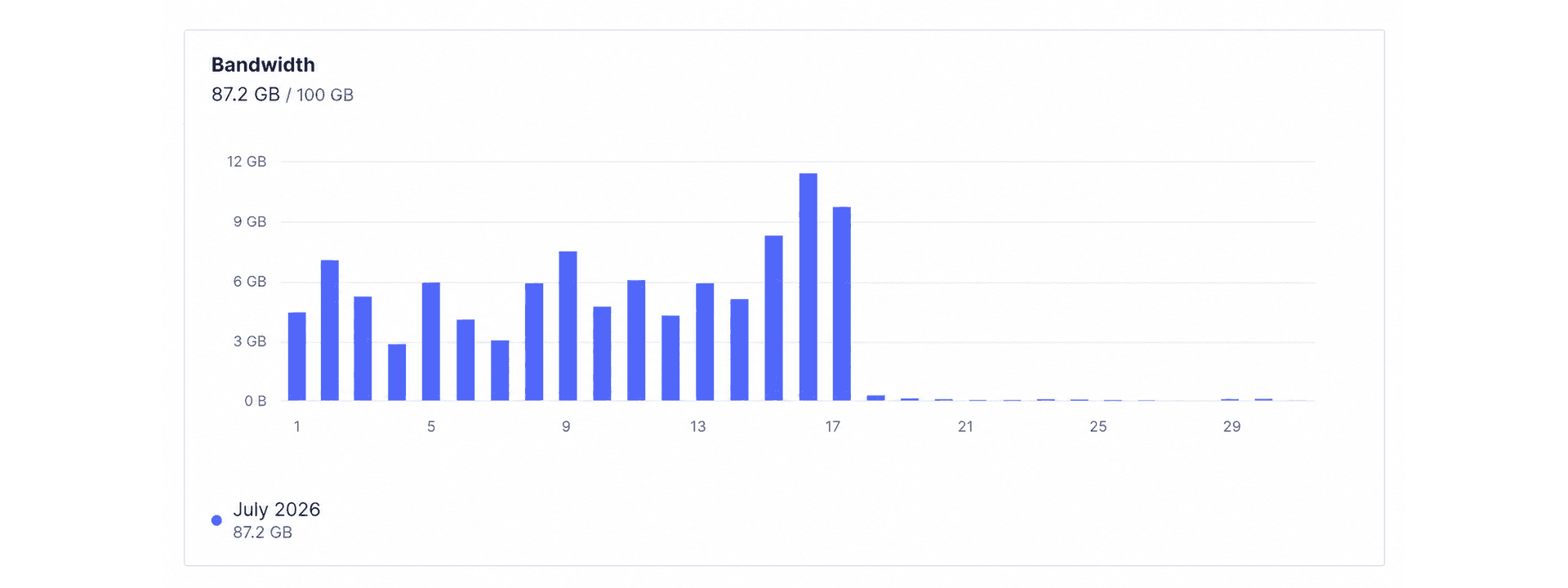
Moving bytes between providers doesn't make them free. Blob's charges include storage and usage, and other providers have their own allowances and pricing. Your image optimiser and public delivery layer still do work as well.
Compare the CMS transfer you remove with the storage, operations, transfer, transformations, and maintenance you add. Include the initial library copy. If your existing CMS allowance comfortably covers your traffic, the extra machinery may not justify itself.
If CMS bandwidth is becoming a publishing or availability risk, I can trace the asset requests, cache behaviour, and delivery costs as part of headless CMS integration work. That review establishes whether a storage mirror is worth the additional sync and maintenance work for your site.
For an image‑heavy site under bandwidth pressure, the calculation can be much more compelling. Alongside the financial question is the operational one: how much of the website currently depends on continued access to the CMS's image service?
A mirror won't keep fresh content flowing through a CMS outage. It can let already synchronised images continue to be delivered and optimised without another request to that CMS. That's a useful dependency to remove.
Wrapping Up
CMS bandwidth deserves attention before the allowance becomes a problem. On some plans the consequence is a larger bill. On others it can interrupt the site's ability to serve content or publish updates, at exactly the time traffic is highest.
A synchronised image mirror gives you control over that part of the delivery path. Keep editing in the CMS, copy new and changed assets into suitable storage, and let repeated image delivery use those copies.
The details which make it dependable are worth the effort: persistent state, stable asset identities, complete mappings, and a retry strategy which doesn't lose changes. Get those right, and CMS image traffic can follow the work your editors are doing rather than repeatedly supplying the same source images.