Staying Current: Automating Copyright Year Updates

In Brief
If a site displays the current year in its footer, derive it consistently from the build or runtime date rather than maintaining a hard‑coded value by hand. Choose the intended time zone when the New Year boundary matters. The notice does not create copyright protection, and a current year is not evidence that the site's content was recently reviewed or updated.
The rumble and echoes of fireworks die away, and the New Year begins. With 2024 upon us, a footer that still says 2023 is a small but visible sign that nobody has checked the site recently.
Consider this your annual reminder: it is time to update the year in your website footers and copyright notices!
And, if you haven't yet found a way to automate this (it's 2024, you really should have done by now!), then now is an opportune time for me to walk you through a few different techniques that will automate this process for you in the future, instead of spending your New Year's morning doing find‑and‑replace across multiple different codebases...
Why Does the Wrong Year Matter?
It may seem minor, but updating the copyright year on a website is the sort of detail that holds a little more significance than you might initially think. As much as anything else, it's about professionalism; the perception of currency and being up‑to‑date rather than anything more substantial around legal risk.
An up‑to‑date footer year can contribute to the perception that a site is maintained, but it does not demonstrate that the content itself is current. A page can generate the present year automatically whilst its information remains unchanged.
Copyright protection does not depend on displaying a notice or the current year. A generated footer year also does not establish when particular content was published or last modified; those claims need their own reliable records and visible dates where relevant. The notice is therefore a presentational convention, not evidence that creates or renews protection.
Keeping the footer year current can still be a tidy, professional convention, and automating it avoids a small annual maintenance task. It should not be presented as legal compliance or as proof that the site is trustworthy and up to date.
Automating the Year in Different Languages
So, knowing that you really ought to keep that year up to date, and (still) assuming that you haven't yet found a way of doing it automatically (because in any project, efficiency and automation are key), allow me to share with you some code snippets that I've collected over the years to do just that...
HTML / JavaScript
Although there's no implicit way of displaying the current year in raw HTML (that I am aware of), JavaScript makes this task very straightforward.
Using Vanilla JavaScript
In JavaScript, new Date().getFullYear() gives us the four‑digit year. I tend to put it in a utility function that can be imported across the site. The typed JavaScript, React and jQuery examples below use TypeScript, so compile them before running them in a browser:
const getCurrentYear = (): number => new Date().getFullYear();

export default getCurrentYear;
If you have a static site with no frameworks to lean on, then you can set up a span with the ID 'copyright', and then update it when the page loads like this:
document.addEventListener('DOMContentLoaded', (event: Event) => {
  const currentYear: number = new Date().getFullYear();
  const copyrightElement: HTMLElement | null =
    document.getElementById('copyright');

  if (copyrightElement) {
    copyrightElement.textContent = `© ${currentYear}`;
  }
});
This will then output © 2024 for you.
In React
In React, the process is virtually the same. You can either set up getCurrentYear as a utility function (see my code example above), import it into your component, and then output it like this:
import getCurrentYear from './getCurrentYear';

const Component = () => (
  <footer>
    <span> © {getCurrentYear()}</span>
  </footer>
);
Or, if you prefer not to use a utility function, then you can wrap it all into your component directly like this:
const Component = () => {
  const currentYear: number = new Date().getFullYear();

  return (
    <footer>
      <span> © {currentYear}</span>
    </footer>
  );
};
In Angular
You can bind the current year directly in the template for Angular applications.
Your component (e.g., footer.component.ts) would look something like this:
export class FooterComponent {
    currentYear: number = new Date().getFullYear();
}
And to use it in your template:
<footer>
    © {{currentYear}}
</footer>
In Vue.js
You will hopefully have begun to see a reoccurring pattern here when it comes to getting the current year in JavaScript applications. However, just in case, here's a Vue.js example in case you need it:
<template>
  <footer>
    © {{ currentYear }}
  </footer>
</template>

<script>
  export default {
    data() {
      return {
        currentYear: new Date().getFullYear()
      };
    }
  };
</script>
Using jQuery
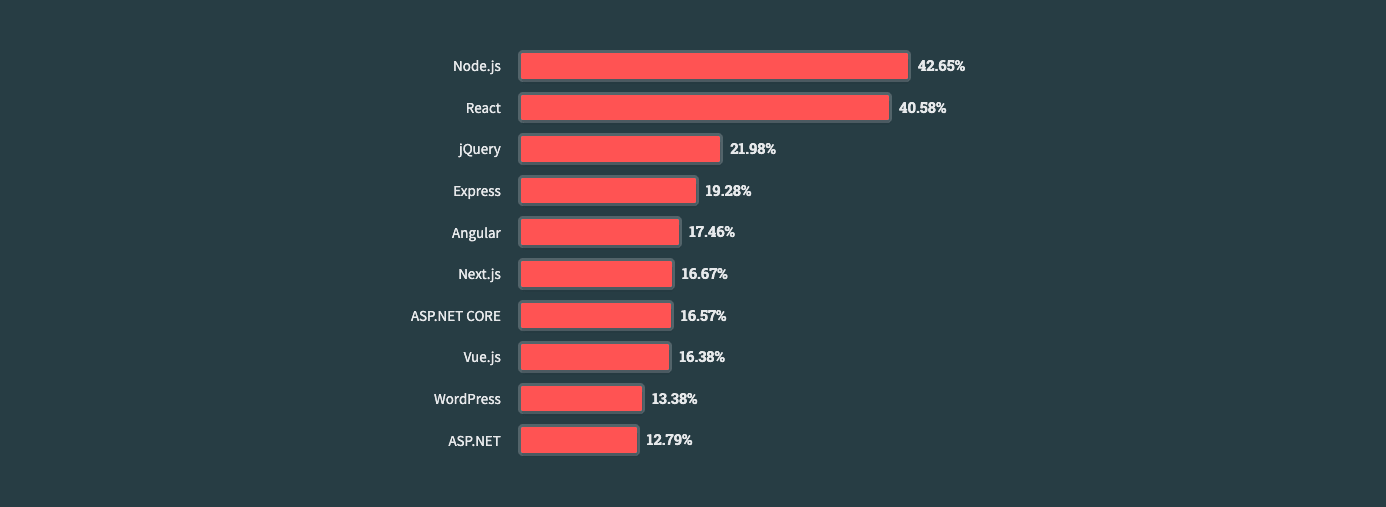
I still include jQuery because plenty of people visiting this blog maintain applications that use it. In Stack Overflow's 2023 Developer Survey, 21.98% of respondents to the web frameworks and technologies question reported using jQuery extensively over the previous year; among professional developers answering that question, the figure was 22.87%. That put it third in those usage results. The survey does not measure repository stars:
I'll maintain what I've said before: some things just don't need the complication of a complete framework to implement, but following the same pattern as I've described for vanilla JavaScript above, you could integrate an automatically‑updating date into your jQuery application by populating it into a span with the ID 'copyright':
$(document).ready(() => {
  const currentYear: number = new Date().getFullYear();
  const copyrightElement: JQuery<HTMLElement> = $('#copyright');

  copyrightElement.text(`© ${currentYear}`);
});
PHP / WordPress
Getting the current year in PHP is arguably even more straightforward than in JavaScript, simply requiring that we use the date function, passing in the correct DateTimeInterface::format():
<?php echo "© " . date("Y"); ?>This code dynamically gets the current year and echoes it out wherever you place the snippet. Insert this line of code in the HTML structure of your footer, and it will display the current year.
WordPress
Much like React and Angular are just JavaScript frameworks (and can therefore use vanilla JavaScript), the same is true of WordPress and PHP. In order to ensure that your WordPress site's copyright notice always shows the current year, you just need to find your theme's footer file (usually footer.php directly inside your theme directory), drop the above snippet in place of the static year, and upload the changes.
Ruby on Rails
In a Ruby on Rails application, you can dynamically display the current year by embedding it directly into your views using the Time class:
#  In your view file (e.g., app/views/layouts/application.html.erb)
© <%= Time.now.year %>
Python (Django/Flask)
Django
In Django templates, you can use the now template tag like this:
<!-- In your Django template -->
© {% now "Y" %}
Flask
In Flask, you can pass the current year from your route to the template:
#  In your Flask route
from flask import render_template
from datetime import datetime

@app.route('/')
def home():
    return render_template('index.html', current_year=datetime.now().year)
Then, use it in your Jinja2 template like this:
<!-- In your Flask template -->
© {{ current_year }}
.NET (C#)
In a .NET environment (particularly in an ASP.NET MVC application), you can use Razor syntax to display the current year in your view (e.g., _Layout.cshtml):
© @DateTime.Now.YearJava
And finally (for this list at least), if you are working in a Java/JSP application, you can use LocalDate:
<!-- In your JSP file -->
© <%= java.time.LocalDate.now().getYear() %>
I should mention here that you could also be tempted to use util.Date().getYear() and then add 1900 to it, but please don't do that; it has been deprecated for many years.
Best Practices and Common Mistakes
Best Practices
Consistent Implementation:
whatever the method you choose to use, it's important to make sure that you are consistent across all pages within your application. Inconsistency could lead to confusion and situations where some areas of your site report one date whilst others report another. This is why I like to create a single utility function in my projects and then import and use that everywhere it is needed.Use Reliable Time Sources:
Always use the methods or functions provided by the programming language or framework you are using to get the current year. Avoid hardcoding values ‑ they will simply become outdated.Optimise for Performance:
Make sure that the script or code snippet used does not adversely affect the loading time or performance of your website.Plan for Time Zone Differences:
Websites are global by their very nature, so it is important to consider what impact (if any) time zone differences might play on the displayed year for your application during the New Year transition.
Common Mistakes
Forgetting to Update them All:
There are two things to consider here: make sure that every instance of copyright year is changed to your automated approach. You also need to ensure that any other date references on your website are also updated as needed.Using Deprecated Methods:
I'll admit that I'm not a Java developer by any means, so when I first wrote this article, I suggested using a snippet I'd found off the internet, which usedutil.Date().getYear(). I very quickly came to realise that this had been deprecated literally decades before. So, don't be like me, avoid using deprecated functions or methods (likegetYear()in JavaScript or Java); you never know when future versions of the language might remove them altogether.Overcomplicating the Solution:
At the end of the day, it's just a four‑digit number. It needn't be overly complicated, so choose a solution that is as simple as possible for your needs.
Wrapping Up
This has probably become one of the longest articles I've written, so I'd best make this snappy: the automatic updating of the copyright year on your website is more than just a trivial detail. Keeping it up‑to‑date and accurate is a mark of professionalism and an indication of a well‑maintained digital presence.
There are lots of ways to achieve this automatically depending on your needs, your framework or language, and your application. None of them are complicated. There's no excuse for hardcoded years, even in the most basic of website footers.