Detecting and Dealing with Website Theft

It was Oscar Wilde who once said:
“Imitation is the sincerest form of flattery...
And often, when quoted, that is as far as the quoter will go, intending to use the quote as a modern way to brush off mimicry as little more than paying a compliment. The full quote, however, is a little more devastating, although perhaps a lot less modern and a lot more clunky to use:
“Imitation is the sincerest form of flattery that mediocrity can pay to greatness.
In context, what he actually says is that should imitation have to occur, then we can be confident in the fact that the individual doing the imitation is ‑ at best ‑ mediocre. The act of imitating is flattering by the very fact that it demonstrates just how unable and second‑rate the imitator is when compared to the imitated.
In the world of web design and web development, the act of imitating, copying, or outright stealing another person's work is rife. I have found versions of my personal work more times than I care to remember, and I have never found it flattering.
For me, this has all risen to the surface again very recently when I stumbled across an almost exact replica of my (very recently released) personal website. They have not only replicated the look and feel down to matching structure, colours, and fonts, but they had gone as far as to outright copy the text I'd written about myself.
Apparently, I had changed my name, moved to Aberdeen, and gotten a lot worse at both spelling and web development judging by that portfolio...
Due to the nature of the web, this sort of thing is incredibly common: your server delivers a copy of your work straight to their browser every time it is requested by anybody. Once it's there in their browser, it is often as easy as a File > Save click away, although there are some steps you can take to avoid making it too easy.
This has been happening with my own personal websites as far back as 2007. Seeing your hard work misappropriated or used as a marketing tool for somebody else never gets easier.
Although the real‑world likelihood of my website ever getting confused with either of the above examples is very slim, it still very much amounts to copyright theft. An author would not allow you to publish a copy (or even part) of their book without permission, Apple spent seven years protecting their IP against Samsung, and in 1978, Twentieth Century Fox sued Universal Studios because Battlestar Galactica stepped just a little too far into the Star Wars universe. That video is absolutely fascinating, by the way!
Copied text can cause problems in search, too. Google normally chooses a canonical representative from duplicate or very similar pages; it does not simply remove both because it cannot establish which came first. The frustrating possibility is that it chooses the copied page instead of yours. Its canonical URL guidance explains how those signals work.
This sort of copying is virtually ubiquitous with younger, rookie developers starting out; my About page is a very common source for other developers' biographies and LinkedIn profiles:
Whilst some are happy for their work to be reused by anybody (even going as far as to publish it in free‑to‑access Git repositories), there are many who take ownership of their intellectual property very seriously. For them, there are a few steps that can be taken to help minimise copies and to detect and deal with those who copy it anyway quickly.
Detecting Copied Text
As I mentioned above, it is impossible to stop people from copying and reusing your work if it is published online, and although there are ways you can intercept, track, and educate potential copiers, the fact is that if you get enough visitors to your site, your work will eventually find its way onto another website, advertising another (competing) person or company.
There are two key tools you can use to detect when this happens.
Google Alerts
As I've talked about previously, I track clipboard events on my websites and inject a copyright notice into them if something is copied off the site. It's a very simple process which does two things for me:
- Makes sure that the person copying off the site is aware that the stuff they are copying is copyright protected;
- Keeps a log of specifically what text was copied and when.
This second point is very useful: it gives me a heads‑up of exactly what text I might later find being reused without permission.
Google Alerts is a free way to look out for distinctive excerpts from your text. Put an excerpt in quotation marks, review any matches it finds, and choose how often you want alerts. It is a useful discovery aid, but it cannot promise to find every copy.
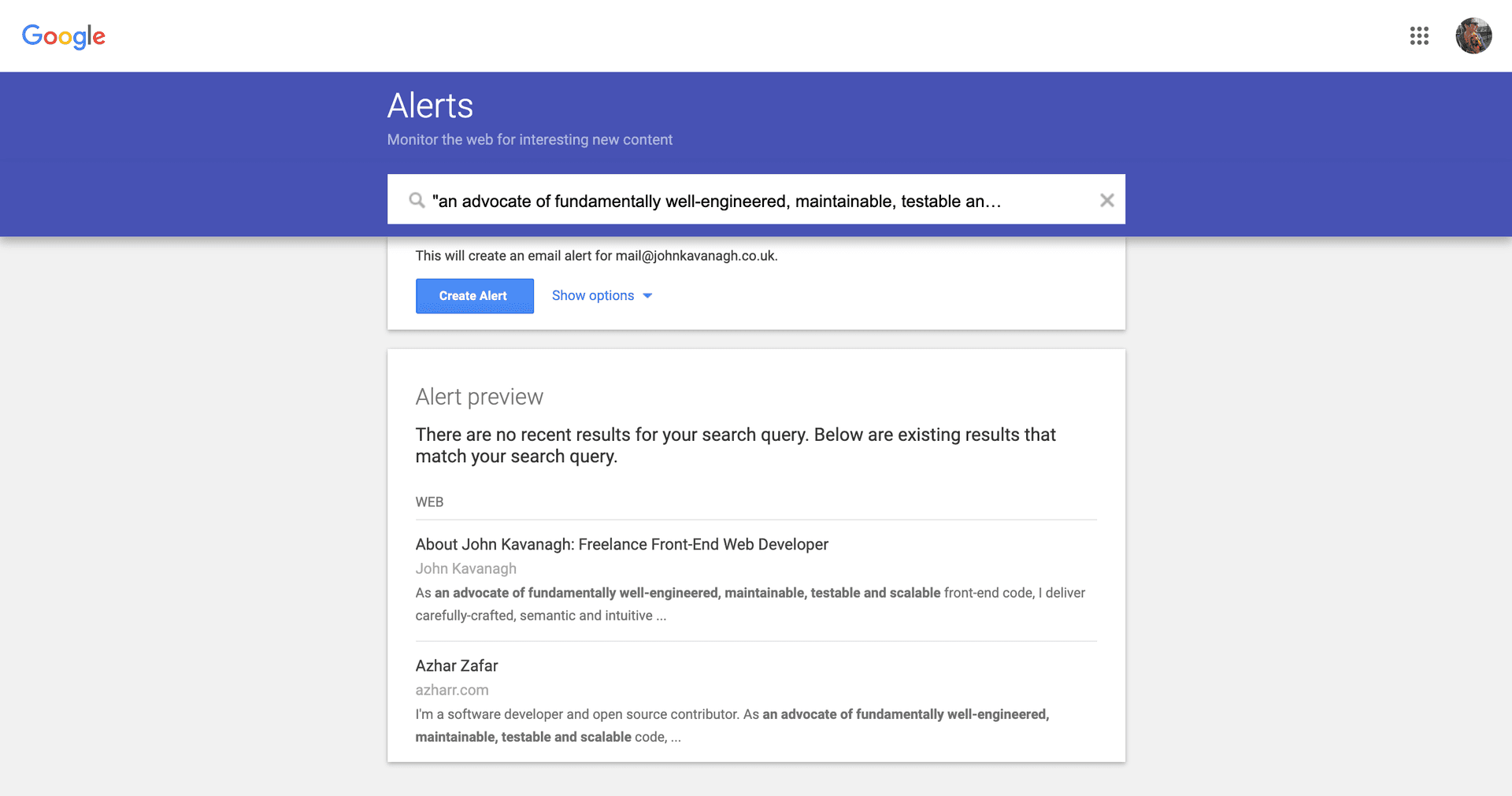
The two important settings to pay attention to when setting up an event are:
How often:
As‑it‑happensHow many:
All results
Those settings request frequent alerts and a broader set of results. They do not guarantee an immediate email or every matching page, so I treat the alerts as leads to check rather than a complete monitoring system.
Copyscape
Copyscape is the other tool I use semi‑regularly. This isn't free, but is very affordable and worth the money ‑ each scan of my personal website, including the blog articles tends to come in under a couple of quid.
Their 'Batch Search' tool allows you to input a list of URLs (line‑separated), which it then treats as the content source during its scan. This is one of the main reasons that I still maintain and generate a urllist.txt sitemap ‑ you can literally just copy the whole list into Copyscape and hit the 'Start the batch' button.
The scan returns pages where Copyscape has found matching text, grouped by URL. That gives me somewhere to investigate. A match does not, by itself, establish who wrote the text first, who owns it, or whether its use is permitted:
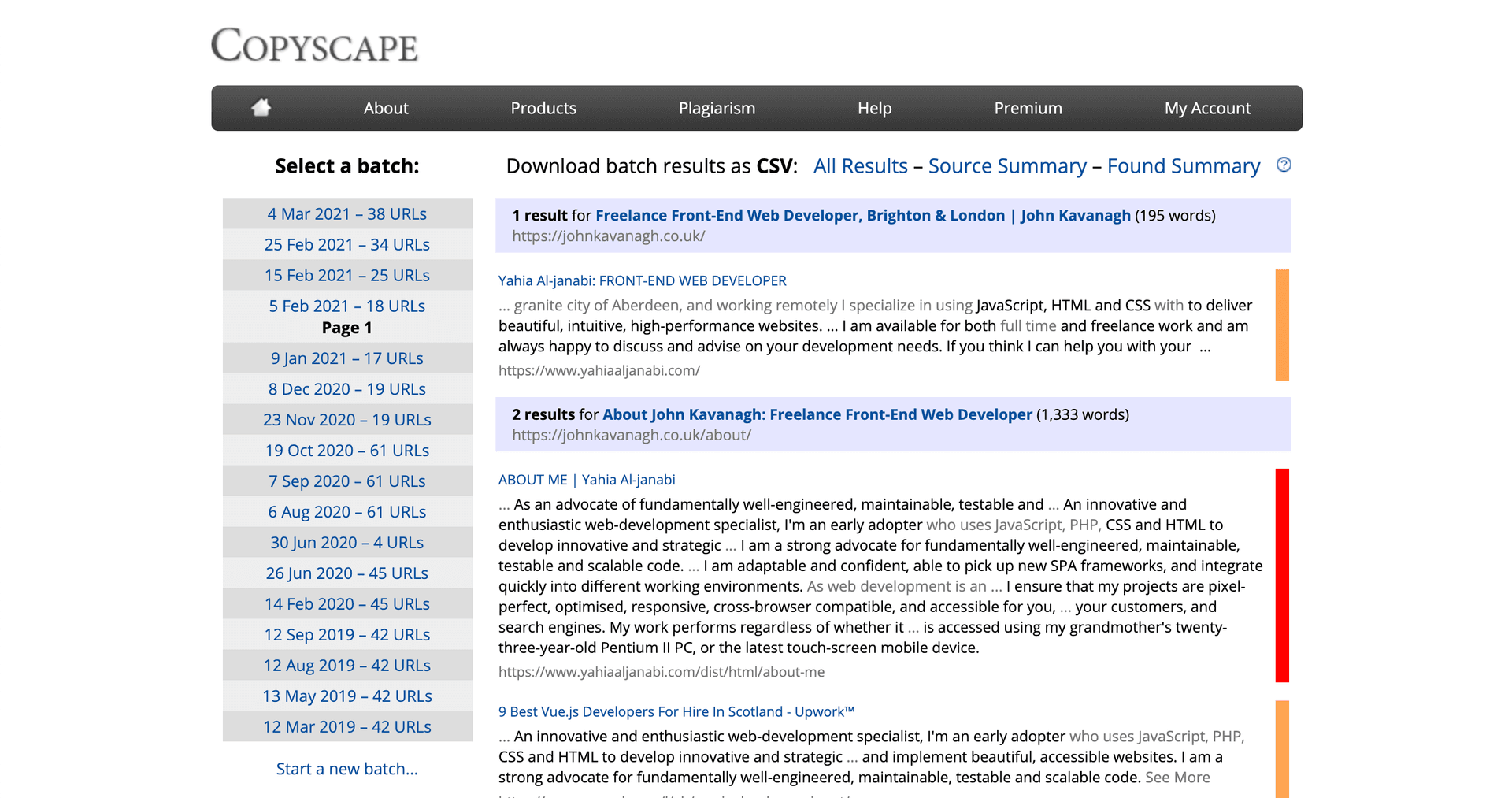
Copyscape does also offer a more automated scanning and protection service where it does these scans for you on a regular basis. For me, I feel that simply logging on and running a manual batch scan occasionally is more than enough to keep track of things.
Detecting Copied Code
Generally, the most sure‑fire indicator you can have that somebody else is attempting to use your code online is hotlinking: where they have a copy of your code but haven't ‑ yet ‑ edited out all the links back to your domain and your server.
It falls a little outside the scope of this article to delve too deeply into this one, but suffice it to say: it is well worth keeping an eye on your server error logs. If you start to see remote URLs attempting to call assets from your site ‑ especially static assets like CSS or JavaScript ‑ then it is well worth taking a deeper look into those referrals to see why another site might be loading in your code.
What to Do Once You've Found a Copy
If you do find somebody else has copied your work, there are a number of different options you can take, ranging from very soft‑touch all the way up to the more drastic, permanent action.
Reach Out to Them
This is the easy one. During your first communication with the copier, there is no need to be confrontational; just a simple message saying, "Hey I'm pleased you found inspiration in my work. Could you not copy it outright though, please?" is often all it takes to make the problem go away:
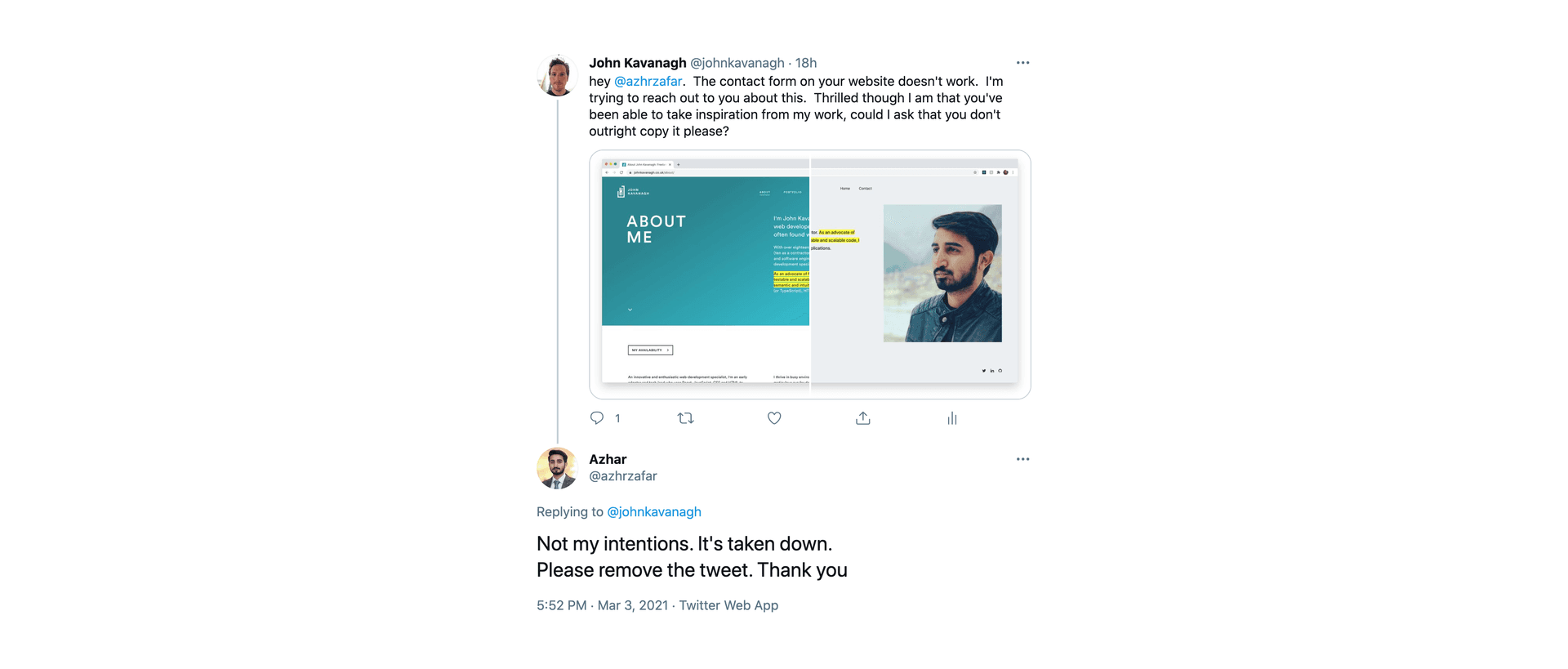
Sometimes actually finding their contact details can be a little more difficult: if there's no contact form or email address on the website itself then try Twitter or LinkedIn, or even take a look at the domain's WHOIS registration data.
Failing That..
Sometimes you cannot find contact details, receive no reply, or, as I've experienced a few times, are told to unceremoniously insert your copyright where the sun don't shine. I would always try the softer approach first. If that fails, check the host's copyright complaints process and whether a formal notice is appropriate.
The US Digital Millennium Copyright Act includes a notice‑and‑takedown and safe‑harbour framework under section 512. It is US law, not a worldwide removal order. Providers outside the US may accept copyright notices under their own policies or the law that applies to them. Before submitting a notice, check whether the use is actually infringing, including any relevant licence or copyright exception.
Shift4Shop has a very helpful single‑page generator which you can use to generate your notice. There are a few places you can send this:
To the Website Owner
If you have a way of contacting them, send it to them. Chances are that they won't react favourably to this given that you have already reached this point, but it is a solid step to take.
To the Website Host
Who Hosts This can help identify the host. Follow that provider's copyright complaints process and explain which material you own and where the allegedly infringing copy appears. Hosting copyrighted work is ordinary; the concern is use that infringes the rights in that work.
I've found that searching for the hostname with 'DMCA' appended will often lead you to their legal documentation and process. For example, here is Digital Ocean's. If searching in this way does not work, try using Command‑F on the host's Policy pages (usually in their footer) for an email address, or even use their social media accounts to ask for their legal contact details.
The host will assess the notice under its process. Removal and response times vary, and a counter‑notice may lead to material being restored. Keep a copy of your evidence and correspondence rather than assuming that sending a notice settles the matter.
To Google
You can also ask Google to remove allegedly infringing URLs from its search results. That is separate from removing the copy at its host: a page can remain accessible directly even after it disappears from Google.
Use Google's copyright removal form, identify each affected URL, and explain your ownership and the alleged infringement. Google reviews the request; neither removal nor a particular response time is guaranteed.
To Bing
Bing has a similar copyright reporting process for its search results. In the cases I have dealt with, Bing has tended to reply faster than Google, but that is my experience, not a promised turnaround.
To Others
If your work appears on a platform such as LinkedIn or Facebook, use its copyright reporting process. The platform will assess the complaint under its rules; submitting one does not guarantee removal.
After All That..
With luck, the owner or host will remove the infringing copy. If a search provider accepts your request, it may remove the reported URLs from its own results, but that does not settle what other search engines show. Check the outcome of each complaint separately.
I have usually found that by the time Google has come back to me about a notice, the owner or host has already taken action to remove it themselves.
What If I Want to Be the Copier?
I should say that people's personal feelings on this type of copying and imitation vary drastically: we live in a society where developers very freely place their work in open‑source licences or free‑to‑use Git repos. On the flip side: a lot of the projects I work on are very stringently protected and I go well out of my way to make this as clear as possible to my visitors.
Somebody somewhere has often spent a significant amount of money on the works you see online on every website, it is entirely their prerogative to protect their ownership if they so wish.
If you come across a website or a piece of work that you find particularly inspirational then the first thing you should always do is reach out to the website owner and ask. It is a simple, easy, quick, and respectful thing to do. Even if the owner doesn't want you to copy their work outright, they may be happy to point you in the right direction or towards close alternatives. I am certainly always happy to offer guidance and advice, even though I really do not want you using my personal website to try and sell your wares.