Building a Low‑Data Web Experience Without Relying on Prefers‑Reduced‑Data

On this visit‑planning page, you can choose a repair, confirm a time, and read how to reach the workshop without fetching the arrival diagram or video. Both are available if you want them. Neither starts downloading just because you opened the page.
That distinction is the basis of a useful low‑data mode: preserve the task and let the visitor decide which additional material to load. The example is a fictional workshop, with a local demonstration form rather than a real booking service. It gives us something concrete to test, including the less exciting result that both modes transfer exactly the same number of response bytes on a warm revisit.
Don't Wait for a Universal Preference Signal
The name prefers-reduced-data suggests a convenient CSS solution. Its production support doesn't justify relying on it.
As checked on 16 November 2026, MDN's compatibility data for the media feature records a Chromium implementation behind an experimental platform flag. That is different from ordinary browser support. The separate navigator.connection.saveData property reports an expressed data‑saving preference where available, with significant gaps:
| Browser family | Reduced‑data CSS by default | saveData in compatibility data |
|---|---|---|
| Chrome and Chromium Edge | No; experimental flag only | Supported |
| Firefox | No | Not supported |
| Safari, including iOS | No | Not supported |
This table comes from the compatibility documentation; I haven't tested every browser engine. An implemented property also doesn't guarantee that a particular browser product gives its user a working setting for it.
A missing or false signal tells us very little about the connection's cost, reliability, or speed. It certainly doesn't tell us somebody's income. In this example, all those cases start with essential content. A positive hint adds a short explanatory message, and an explicit choice to load more still wins.
The underlying approach is familiar from respecting reduced‑motion preferences: make the complete basic experience work, then add the optional behaviour deliberately. The two media features have different support histories, so don't transfer assumptions from one to the other.
Decide What Can Actually Be Omitted
The planner's first HTML response contains the form, available repair categories and times, and full written directions. A normal form POST returns a confirmation page with those directions. JavaScript enhances the same task into an in‑page confirmation; disabling it doesn't remove the task.
The supplementary material is small and specific. An original diagram shows the fictional site. A silent, roughly three‑second animation traces the same route. A more detailed text guide can be opened through an ordinary link.
Essential mode offers separate load buttons for the diagram and animation, with approximate encoded file sizes. Loading the diagram doesn't quietly fetch the video or change the saved preference. Choosing Load optional media loads both and fetches the detailed guide in advance. That guide is real content reused when opened, rather than a dummy response added to make a benchmark look better. Nothing plays automatically.
This classification depends on the task. A product photograph, diagnostic image, or floor plan may be essential information. Removing it because it happens to be an image would make the byte count smaller and the page worse. Keep an appropriate representation of the information, with useful alternatives, before calling something optional.
Keep Optional URLs Out of the Initial Fetch Path
The initial document has no optional src, srcset, video poster, preload, prefetch, or CSS background URL. JavaScript knows where to find the optional files, but only requests them when the visitor's choice allows it.
This matters more than hiding a media container. Once the browser has started a download, a late preference read cannot recover those bytes. Native lazy loading is useful for ordinary performance work, but it isn't an instruction to wait for explicit consent to load an image.
A saved richer preference can add media after the script starts. A saved essential preference has no initial optional request to undo. The first response remains useful even if the script fails.
Remember the Choice Without Depending on Storage
The saved record contains a version, the selected mode, and a timestamp. The example accepts it for up to 30 days, rejects future timestamps, and falls back to essential content for invalid or expired records.
Local storage has no built‑in expiry. The application checks the age when it reads the record. The browser may clear storage earlier, and the record won't automatically delete itself when the 30 days are up.
There is a small trap in error handling here. Accessing localStorage itself can throw, so fetching it before entering a guarded function isn't sufficient. The adapter defers that access:
type StoragePort = Pick<Storage, 'getItem' | 'setItem'>;

const storage: StoragePort = {
  getItem: key => localStorage.getItem(key),
  setItem: (key, value) => localStorage.setItem(key, value),
};
The reader calls storage.getItem(...) inside its try block, parses the record as unknown, and validates its fields. The writer follows the same pattern:
export type Preference = 'essential' | 'richer';
export const preferenceKey = 'workshop-media-v1';

export const savePreference = (
  storage: StoragePort,
  preference: Preference,
  now = Date.now(),
): boolean => {
  try {
    storage.setItem(preferenceKey, JSON.stringify({
      version: 1,
      preference,
      savedAt: now,
    }));
    return true;
  } catch {
    return false;
  }
};
If saving fails, the current page still honours the choice and says it cannot remember it. A storage problem shouldn't turn an ordinary preference control into a broken form.
The local implementation and reproduction commands include the reader, browser application, original assets, and local server. The assets all come from the same origin. A media preference wouldn't replace a separate permission requirement for a third‑party embed. You can download the low‑data example and measurements.
Changing Your Mind During a Download
Switching back to essential content stops outstanding optional fetches, removes loaded media, pauses the video, and revokes its object URL. Already opened guide text can remain. Previously transferred bytes remain transferred.
Cancellation also needs to cover a response that has arrived but hasn't yet been attached to the page. The example gives each load a generation number. Starting or cancelling work invalidates older completions:
export class OptionalRequest<T> {
  private generation = 0;
  private controller?: AbortController;
  private pending: Promise<void> = Promise.resolve();

  constructor(
    private readonly load: (signal: AbortSignal) => Promise<T>,
    private readonly attach: (value: T) => void,
    private readonly error: (error: unknown) => void,
  ) {}

  start = (): Promise<void> => {
    this.cancel();
    const generation = this.generation;
    const controller = new AbortController();
    this.controller = controller;

    this.pending = this.load(controller.signal).then(value => {
      if (generation === this.generation && !controller.signal.aborted) {
        this.attach(value);
      }
    }).catch(error => {
      if (generation === this.generation && !controller.signal.aborted) {
        this.error(error);
      }
    });
    return this.pending;
  };

  cancel = (): void => {
    this.generation++;
    this.controller?.abort();
    this.controller = undefined;
  };

  settled = (): Promise<void> => this.pending;
}
The loader reads the response body as a blob; the attachment callback creates the media element and object URL only after that check. This is appropriate for the bounded, small assets in the example. Fetching an entire long video into memory would need a different design.
Failed optional fetches leave a readable message and an explicit retry through the same button. Those fetch failures leave the form usable. The tests don't establish recovery from a media‑decoding failure after a successful fetch. The browser test pauses after a response has arrived, changes the preference, then lets the response continue. The unwanted media stays absent even though cancelling the network request alone would be too late.
Count the Completed Task, Including the Cache
The comparison recorded on 16 November 2026 uses Chrome 157.0.8103.51 against a local Node 22.23.4 server. Text responses are gzipped; versioned assets have immutable caching headers. Documents and form responses use no-store. Each run selects Radio and Saturday, 14:00, submits the form, and receives the same confirmation.
For each mode, three fresh browser contexts provide cold visits. Each context then makes an ordinary return navigation for its warm visit. Cache remains enabled, there is no request interception, and the saved preference is installed before the first navigation without warming any resources.
Capture finishes after both the form confirmation and any optional work have settled. Otherwise, a quick form submission could make a download disappear from the accounting simply because it was still running.
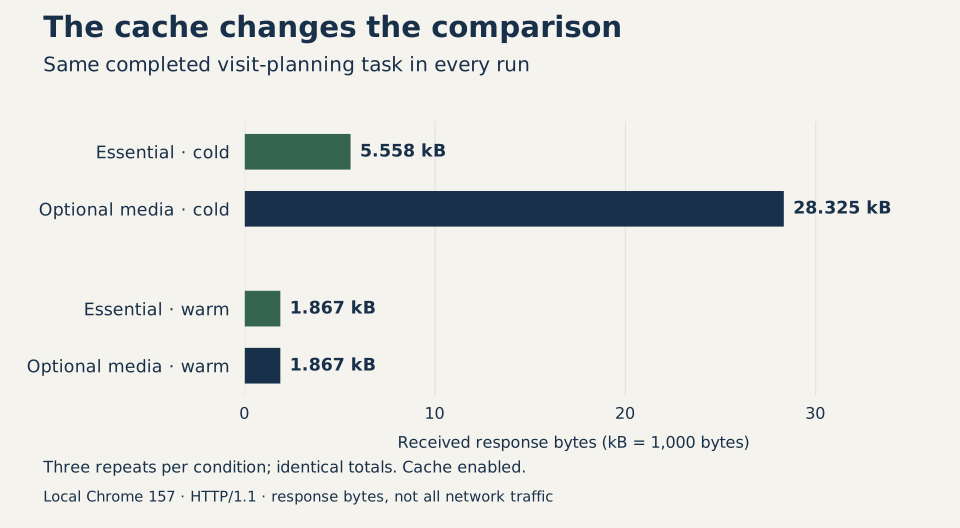
| Mode and cache state | Observed HTTP resource requests | Responses sent by the server | Received response bytes |
|---|---|---|---|
| Essential, cold | 4 | 4 | 5,558 |
| Optional media, cold | 7 | 7 | 28,325 |
| Essential, warm | 4 | 2 | 1,867 |
| Optional media, warm | 7 | 2 | 1,867 |
All three repetitions produced those byte totals. The richer cold visit added the diagram, animation, and guide. On the warm visits, cached resources were still requested by the page, but the server received only the document request and form submission. There was no further media transfer to avoid in that run.
The primary metric sums Chromium's Network.loadingFinished.encodedDataLength once for each completed same‑origin HTTP response. Blob playback is excluded so the already fetched video isn't counted again. Failed requests have unknown total received bytes and are kept separately; the comparison runs contain none.
Raw server receipts and Navigation/Resource Timing records accompany the results. They aren't interchangeable measurements. In particular, the Resource Timing specification gives transferSize standardised overhead and cache rules rather than actual response‑header accounting.
These are the response bytes Chrome reported for this example, including the helpers used to inspect it. They exclude upload and connection overhead and say nothing about a mobile bill. This is also separate from reducing CMS‑origin image bandwidth: moving an image's source can reduce CMS traffic whilst leaving the visitor's download unchanged. As with environmental claims about websites, a byte count alone doesn't establish energy or carbon savings.
Check That the Task Still Works
Six helper‑test groups cover preference validation, expiry, denied storage, and late results. Eleven browser‑test groups cover the complete task, explicit overrides, reload and navigation, individual media requests, cancellation, retry, guide reuse, and the JavaScript‑disabled form. Keyboard activation retains the media button's focus; switching mode retains the preference control. The narrow layout was checked at 390 pixels.
Lighthouse 13.6.0 scored both modes 100 for its automated accessibility checks. That doesn't establish screen‑reader announcements, usability on an unreliable connection, or behaviour in Safari and Firefox. Those remain separate checks for the browsers and users a product needs to support. I haven't compared the loading speed of the two modes.
You can complete the form without the extras, load just the diagram if it helps, or choose to load everything. The warm‑cache result is a useful reminder that there may be no further transfer to save on a return visit. Keeping that choice with the visitor still makes sense.