Shipping View Transitions with Accessible Navigation Fallbacks
A route transition can look finished whilst leaving keyboard focus on the document body. It can also look switched off in React whilst the browser continues to fade the whole page. Both happened in the small application behind this article.
Neither problem needed a more elaborate animation. They needed a usable navigation baseline and tests that watched the right things.
The example is a fictional repair workshop. Choose a lamp, chair or radio from a catalogue, read its preparation instructions and tick a local checklist. The application has the same content with motion enabled or disabled. A delayed response and a deliberately failed request exercise the awkward cases that a quick demonstration tends to miss.
Keep Navigation in Charge
This is an isolated Next.js 16.4.6 App Router application, separate from this website's Pages Router implementation. Its package pins are React and React DOM 19.3.1; Next bundles its own App Router runtime, identified in this build as 19.3.0-canary-278794d7-20261002. The measurements apply to that exact build. React 19.3 made ViewTransition stable, and the current Next.js integration guide needs no experimental configuration for this combination. If you're following older canary instructions, check which versions they were written for.
The links remain Next links. There is no click handler that prevents navigation, waits 180 milliseconds and then changes the URL. There is also no application call to document.startViewTransition: React coordinates that operation.
A small wrapper records the intended destination through onNavigate:
export const RouteLink = ({
  href, children, ...props
}: {
  href: string;
  children: ReactNode;
  className?: string;
  target?: string;
}) => {
  const navigation = useContext(NavigationContext)!;
  return (
    <Link
      {...props}
      href={href}
      prefetch={false}
      onNavigate={() => navigation.arm(href)}
    >
      {children}
    </Link>
  );
};
This is an excerpt from the complete client component; the imports and provider are in the accompanying source. Prefetching is disabled deliberately in this experiment so that the delayed route is requested when selected. It is not a recommendation to disable prefetching throughout an application.
Next's onNavigate callback runs for client‑side navigation, unlike a general click handler. Modified clicks and a link targeting a new tab retain their native behaviour. The browser tests exercised both, including a real macOS Meta‑click. My next/link article covers the underlying navigation component.
Focus the Destination That Actually Arrived
With the application's focus handling disabled, the lamp detail loaded but document.activeElement stayed on BODY. That's the behaviour I needed to fix here. Check what your own application does before copying the same approach.
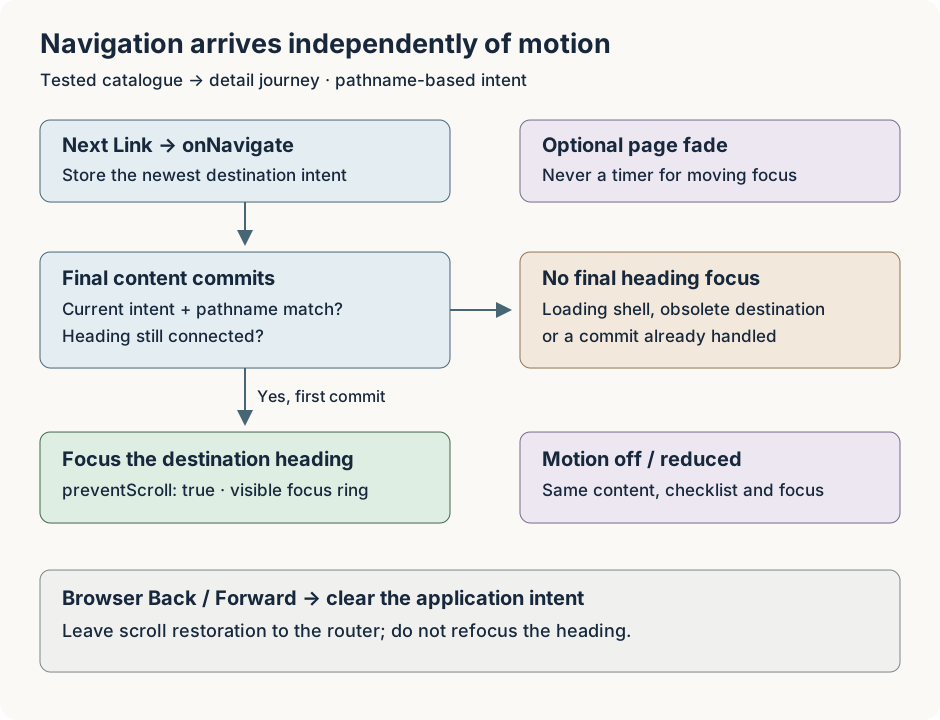
The provider stores the newest navigation intent in a ref. A destination heading calls the provider from a layout effect when its final content commits. The heading has tabIndex={-1}, so it can receive programmatic focus without becoming another stop in ordinary Tab order.
The essential guard is short:
const commit = (path: string, heading: HTMLHeadingElement) => {
  const active = intent.current;
  if (
    !active ||
    active.committed ||
    active.target !== path ||
    location.pathname !== path ||
    !heading.isConnected
  ) return;

  active.committed = performance.now();
  heading.focus({ preventScroll: true });
};
The full implementation also records timing and focus events for verification. preventScroll lets the router manage scrolling instead of adding a second jump when focus moves. The focused heading gets a visible outline.
Loading content has a status message but no final destination heading. A slow chair response therefore cannot take focus merely because its loading shell appeared. If the reader chooses the lamp instead, the newest intent points to the lamp; the old chair response cannot subsequently focus its heading.
History traversal needs different treatment. A popstate listener clears the application intent, leaving Back and Forward scroll restoration to the router and browser. Opening the page directly or reloading it doesn't request a focus move either. The tests check both restored scroll positions and the absence of another application heading‑focus event.
This policy is intentionally scoped to navigation between distinct catalogue and detail paths. It identifies a destination by pathname. Query‑only filters, hash links and several concurrent operations on the same path need their own identity and focus rules; this example does not establish those rules for you.
Add Motion Without Changing State Ownership
Each participating page wraps its article content in ViewTransition. The persistent workshop navigation sits outside that animated content, so it remains available during a transition. Putting an enter/exit wrapper around a persistent layout would not describe the page entering or leaving.
The motion preference comes from useSyncExternalStore, with a media‑query change subscription. The component keeps the same shape when that preference changes:
const RouteTransition = ({
  enabled, children
}: { enabled: boolean; children: ReactNode }) => {
  const reduced = useSyncExternalStore(
    subscribeMotion,
    () => matchMedia('(prefers-reduced-motion: reduce)').matches,
    () => false,
  );
  const animation = enabled && !reduced ? 'route-fade' : 'none';

  return (
    <ViewTransition
      enter={animation}
      exit={animation}
      default="none"
    >
      {children}
    </ViewTransition>
  );
};
Returning bare children when motion is reduced would change the tree around the preparation checklist. Keeping the wrapper avoids making a preference change an accidental state reset. The native‑browser test ticks an item, changes the preference in both directions and checks that the item stays ticked.
The enabled effect is a 180 ms fade. There is no shared‑element name or directional slide to maintain. That restraint also makes the disabled behaviour easier to inspect.
Test the off Switch at the Browser Layer
An early version used default="none" and disabled the boundary's enter/exit animations. The browser still ran a 250 ms root‑snapshot animation. I'd switched off the animation on the named content, but the browser was still animating the root snapshots.
The corrected stylesheet suppresses root animations and explicitly handles the overlay's pseudo‑elements:
::view-transition {
  pointer-events: none;
}

::view-transition-old(root),
::view-transition-new(root),
::view-transition-group(root) {
  animation: none;
}

@media (prefers-reduced-motion: reduce) {
  ::view-transition-group(*),
  ::view-transition-old(*),
  ::view-transition-new(*),
  ::view-transition-image-pair(*) {
    animation: none !important;
    animation-duration: 0s !important;
    animation-delay: 0s !important;
  }
}
The full CSS defines the named fade and ordinary‑element preference rules too. A universal * rule alone does not target this overlay tree. This extends the principle in respecting reduced‑motion preferences: retain the state and feedback whilst reducing the movement.
Disabled mode still invokes browser transition machinery in this React integration. The test therefore checks the actual animation durations when the transition becomes ready. Checking after it finishes would prove very little. Reduced‑motion checks include a slow content reveal, not just a cached route.
The overlay's pointer‑events rule is useful, but it is not proof that every animated element remains clickable. The acceptance test uses a real second click on the persistent header whilst an animation is ready and unfinished. It then checks the second destination and final focus. A separate test removes the browser API before the application loads and completes the same route and checklist task without it.
Recovery Belongs in the Journey
A failed detail request renders a readable error page with a focused heading, a retry button and a link back to the catalogue. In this pinned Next version, the error component's retry callback refreshes the route and resets the boundary inside a Transition. The API still includes reset; this failed server load needs the re‑fetching retry path.
Retry arms a new intent for the same path before invoking that callback. When the request succeeds, the repaired detail receives focus. The test checks that recovery; a successful HTTP response or a finished animation wouldn't tell us that on its own.
The browser tests cover 15 groups of behaviour, including keyboard activation, absent API, reduced motion, history scroll restoration, slow and superseded requests, a second click during animation, failure/retry, deep links, reload, new tabs and a 390‑pixel layout. Those checks ran in Chrome. I haven't yet checked the spoken output with a screen reader or repeated the tests in another browser engine.
Measure Arrival Separately from Animation Completion
I measured a production build of the example using Node 22.23.4 and headless Chrome 157.0.8103.51 on an Apple M2 host. Each mode had two warmups followed by six measured catalogue‑to‑lamp navigations, alternating which mode ran first. Both rendered the same task content.
The clock starts inside onNavigate. It excludes input delay before that handler. Heading commit, focus and the browser transition's finished promise are separate observations:
| Median elapsed time | Motion disabled | Fade enabled |
|---|---|---|
| Heading committed | 31.45 ms | 31.95 ms |
| Heading focused | 32.15 ms | 32.55 ms |
| Browser transition finished | 63.10 ms | 231.60 ms |
Commit times ranged from 28.80–32.80 ms with motion disabled and 31.10–32.60 ms with it enabled. This small local sample does not establish a meaningful difference in content arrival. It does show why waiting for animation completion would be the wrong focus policy: focus was already established long before the enabled transition finished.
Separate Chrome traces retain the marked journey and browser work. None of these measurements is a paint timestamp, field INP, a mobile performance result or evidence that users prefer the fade. The off mode also retains transition machinery, so this is not a comparison against an application with no ViewTransition component.
You can download the navigation example and recorded results.
Decide What Would Make You Turn It Off
I would keep this effect disabled until the intended Safari and Firefox journeys and named screen‑reader/browser combinations have been checked, including native reduced‑motion settings and zoom. Those checks remain outstanding for this example.
For a real pilot, a lost focus position, broken history return, ignored motion preference or blocked second action is enough to disable the effect. Performance limits should come from the application's existing budget and target devices. Watch the enabled cohort alongside a baseline, with the flag and release recorded in production observability.
In the fixture, the /on and /off routes let me compare both versions and check the fallback; they're only test controls, so a real rollout would need its own feature flag. I'd still want to see whether the animation helps the people using the application before leaving it enabled.