Offline Form Submissions: Recovering Without Duplicate Writes

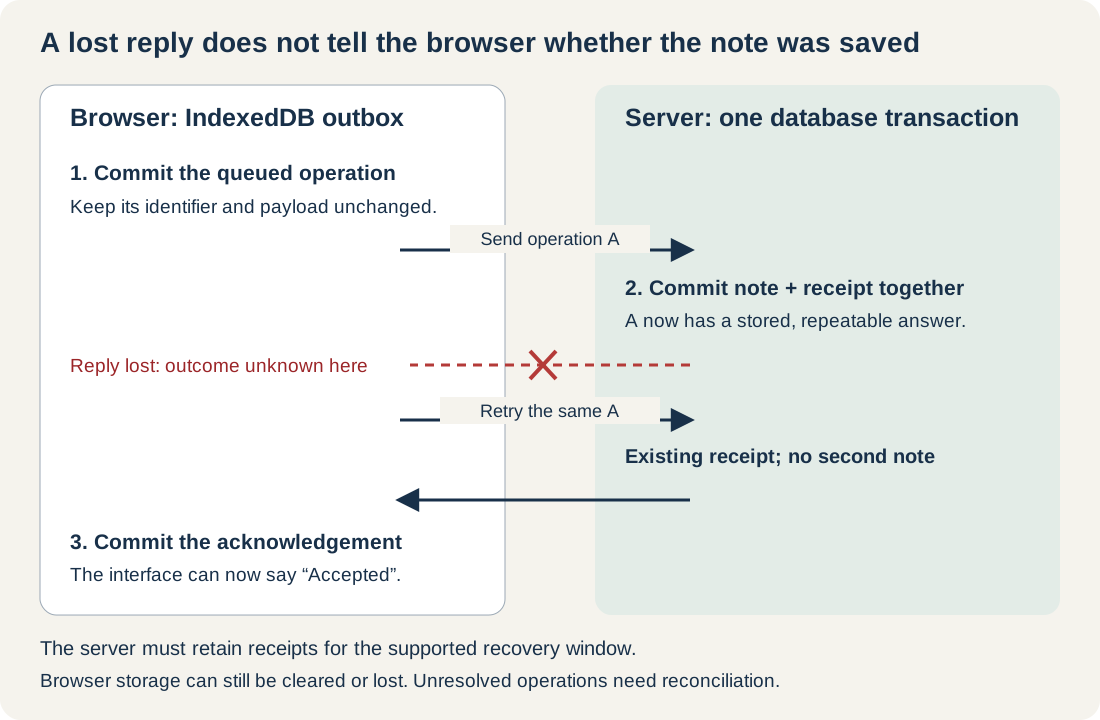
Ellie adds a maintenance note about a sticking workshop door. The server saves it, but the connection drops before the reply reaches her browser. The form still looks unsent.
Sending it again with a new identifier could create a second note. Deleting the local copy could lose the only record the browser has of the attempt. A failed fetch doesn't tell us which of those actions is safe.
This example keeps the note in an IndexedDB outbox and gives the server a repeatable answer for the same operation. The interface distinguishes "saved on this device" from "accepted by the server", and retains ambiguous or rejected work for review. The tests below cover several ways a request can fail. Clearing browser storage or losing the device is a different problem: an outbox on that device can't protect us from either.
The complete local example includes a native browser form, a typed outbox, a real HTTP server, and a file‑backed SQLite database. The account controls are labelled as test controls because they only simulate signing in. You'll need real authentication before using this in a product. You can download the offline form example.
Keep the Operation Unchanged
The queued record contains the user's intended action as well as delivery bookkeeping. The immutable part looks like this:
export type Operation = Readonly<{
  schema: 2;
  id: string;
  actor: 'ellie' | 'maddie';
  ticket: 'workshop-door';
  expectedRevision: number;
  text: string;
  createdAt: number;
}>;
The form generates id once with crypto.randomUUID(). Every delivery attempt carries that same identifier, account, revision, timestamp, and text. Attempt counts and retry times live outside the operation, so updating them doesn't change what the server is being asked to accept.
Using Readonly helps TypeScript callers, but it isn't a storage or security guarantee. The outbox clones the operation and uses IndexedDB's add operation, which refuses an existing key. The server independently validates the payload and rejects reuse of an accepted identifier with different data.
The text is a low‑consequence maintenance note, limited to 500 characters. I wouldn't start an offline design exercise with payments or permission changes. You would also need to decide who can authorise those actions and how to resolve conflicting or uncertain outcomes. Putting them in a browser queue doesn't answer those questions.
Wait until the Local save Has Finished
An IndexedDB request succeeding does not mean its containing transaction committed. Another request can fail, or the transaction can abort afterwards. Clear the form and show the local‑save message only after the transaction's complete event.
Here's the pattern used by the transaction helper:
const tx = db.transaction('outbox', 'readwrite', { durability: 'strict' });
tx.oncomplete = () => resolve(result);
tx.onerror = () => { failure ??= tx.error; };
tx.onabort = () => reject(failure ?? tx.error ?? new DOMException(
  'Local transaction aborted.', 'AbortError',
));
This is an excerpt from the Promise wrapper, whose request handlers collect result. The transaction completion event and durability option describe the relevant browser behaviour. The example requests strict durability for writes, then still treats browser‑managed storage as fallible.
One test deliberately aborts after the insert request succeeds. The transaction rolls back, the note remains in the textarea, and the interface says "Not saved on this device". Separate injected quota and storage‑open failures preserve the text too. The tests inject those failures; they don't fill a physical disk.
Keep a useful error beside the user's work. There is little comfort in a technically correct rejection if the form has already emptied itself. The same distinction between browser feedback and server authority applies to client‑side form validation.
The Server Needs to Remember Its Answer
The server scopes operation identifiers to the authenticated account. It then performs the duplicate check, revision check, note insertion, and receipt insertion within one database transaction.
The essential sequence is:
BEGIN IMMEDIATE
  Find a saved receipt for this account and operation ID.
  If present:
    Reject a different immutable payload.
    Otherwise return the stored receipt.
  Reject an unknown operation outside the recovery window.
  Check the expected ticket revision.
  Insert the note and advance the ticket revision.
  Insert the receipt and the canonical operation payload.
COMMIT
In the implementation, the canonical payload is an array of the named immutable fields serialised in a fixed order. Reordering JSON properties therefore doesn't create a conflict. No hash is needed for this small payload, and no field is silently omitted from comparison.
The stored receipt contains the operation identifier, accepted revision, and acceptance time. A new operation returns HTTP 201. Repeating an accepted operation returns HTTP 200 with the original receipt. Reusing its identifier with a changed body returns 409.
Both the note and receipt must commit together. Inserting the note, then separately writing an entry into an in‑memory map leaves a gap in which a crash can erase the duplicate protection. The example uses SQLite with WAL and synchronous=FULL; a test forces the receipt insertion to fail and verifies that neither the note nor its revision change survives the rollback.
The test runner also sends concurrent requests to two independent server processes sharing the same database file. Twelve identical requests produce one 201 and eleven 200 responses, with one note. Different bodies under one identifier produce one acceptance and a 409. Different identifiers competing for one revision produce one acceptance and a 412.
This is a small synchronous Node server using the experimental node:sqlite API in Node 22.23.4, with SQLite 3.53.4. That keeps the transaction easy to inspect and try for yourself. For a busy application, I'd choose a database setup that doesn't block request handling in the same way.
A Receipt Comes Before the Revision Check
The ticket revision protects against accepting a note based on a stale inspection. Deduplication answers a different question: whether this exact operation has already been accepted.
Suppose operation A was accepted against revision 7 and advanced the ticket to 8. A retry still carries expectedRevision: 7. Checking the current revision first would reject the retry even though the server already knows its successful result. The receipt lookup therefore happens first, inside the same transaction.
An unknown operation with a stale revision receives 412 and stays in the outbox as "Needs attention". The example carries its expected revision in JSON. An API can instead express a precondition through a strong If-Match validator, following HTTP's lost‑update protection rules. That is related to the meaning of strong ETags, but this example does not implement the If-Match header.
This deliberately conservative policy also affects two notes queued offline against the same ticket revision. The first can be accepted; the second requires review. The test confirms that result. Silently increasing the second note's revision would change its meaning after the user had saved it.
If independent notes can safely be appended in your product, you might not need the revision condition. Decide that from what the notes mean and how they're used. Keep conflict recovery separate from transport retry, and create a replacement identifier only after reviewing whether the old operation was accepted and what should change.
let Tabs Compete for Work Without Trusting the Lease
Two open tabs can see the same pending record. Each delivery attempt claims it in a short IndexedDB transaction, then performs the network request after that transaction has finished.
A claim records a 15‑second lease and a fresh token. The token changes for every claim, including a later claim from the same tab. Settlement checks it before changing the stored state:
if (!item || item.state !== 'sending' || item.leaseOwner !== owner) return;If a suspended tab resumes after another tab has reclaimed the operation, its old success or failure cannot overwrite the newer claim. A browser test exercises both stale outcomes. The request timeout is five seconds, including reading the response body, so ordinary attempts should finish within the lease.
The lease reduces duplicate attempts; it cannot guarantee that two requests never reach the server. A tab can be suspended at an awkward moment. The server's durable duplicate check still has to work. The tests first prove that two tabs claim only one lease, then deliberately bypass that coordination and send the same operation concurrently. There is still one accepted note.
Don't hold an IndexedDB transaction open across fetch. Transactions have their own activity and completion rules. Claim locally, fetch separately, then commit the acknowledgement in another local transaction.
Keep Retry Decisions Visible
The outbox has five states, each with a different consequence:
| State | What the interface can honestly say |
|---|---|
| Pending | Saved locally; acceptance is not confirmed. A retry may be delayed. |
| Sending | An attempt owns the current lease. Its outcome is still unknown. |
| Paused | The original account needs to sign in and explicitly resume delivery. |
| Needs attention | Validation, permission, conflict, expiry, or retry limits require review. |
| Accepted | A matching server receipt has also been committed locally. |
Network failures leave the operation pending because the server may already have accepted it. HTTP 429 and 503 receive exponential delays starting at one second, capped at 60 seconds for the local backoff. A longer valid Retry-After still takes precedence. Clicking Retry pending doesn't bypass that wait.
After five attempts, or after the 24‑hour automatic recovery window, an unresolved operation remains visible for reconciliation. It isn't relabelled as definitely rejected. HTTP 403, 409, 410, 412, and 422 also require attention rather than indefinite replay. A received 401 pauses delivery until the original account signs in again.
This example retains server receipts indefinitely. A real system needs a documented retention policy covering its supported recovery window, including ambiguous and delayed attempts. Deleting the server's memory of an operation whilst clients can still replay it invalidates the duplicate guarantee. The broader discussion of service boundaries and idempotency applies just as much to a browser as to any other caller.
Check Identity Again at the Server
Queued records contain an account identifier, but no reusable bearer token. The sender checks the current session before each attempt, and the server derives the current account from its session cookie before comparing it with the operation.
When Maddie is already signed in, the ordinary flush path sends none of Ellie's queued payloads. There is still a race: another tab can switch the cookie after the session check and before the POST. A separate test creates exactly that sequence. The POST can reach the server, but the server rejects it with 403 rather than accepting Ellie's operation under Maddie's account.
The browser check is useful coordination. The server check enforces the rule.
Cached identity lets an already‑used form save locally when the session service is unavailable, with an explicit "unverified offline" label. It doesn't authorise delivery. Nor does filtering the visible list by account turn same‑origin browser storage into a confidential vault. Shared devices and sensitive notes need a storage and logout policy suited to the product.
Test Recovery at Each Interruption
The browser suite runs against actual IndexedDB in Chrome 157.0.8103.51. Its 23 checks include an offline save, a page reload, and a full Chrome process restart with the same profile. The example reloads its page whilst online; shell caching remains a separate concern, as in the Angular PWA guide.
For the lost‑reply case, browser interception allows the real server write to finish and then discards the reply. The browser retains a pending operation. Restarting the server and replaying it recovers the stored receipt with one database effect. Separate HTTP tests destroy the response socket after commit, kill the server process, and verify recovery after restarting against the same database file.
Another browser case interrupts delivery after receiving the response but before committing its local acknowledgement. After the lease expires, the same operation can be replayed safely. A separate test aborts the actual local acknowledgement transaction after its write succeeds and confirms that replay still recovers one accepted note. Lease expiry is advanced deliberately in that test; it isn't a measurement of browser scheduling.
The suite also covers invalid receipts, bounded retries, schema migration, and blocked upgrades. Migrating the queued schema preserves the operation identifier and text. This demonstrates a local record upgrade, not compatibility with receipts from an older server protocol. A production migration must also preserve the accepted payload or explicitly support its earlier representation. An old database connection closes on versionchange; a genuinely blocked upgrade reports that other tabs need closing instead of pretending the outbox is available.
These checks passed in Chrome. You'll still need to run the recovery scenarios in the Safari and Firefox versions you support. I haven't tested screen‑reader output or actual disk exhaustion here, and the outbox can't protect work against losing the device.
Deliver When the Page Can Actually Run
This implementation retries on page opening and through an explicit button. It has no dependency on Background Sync. A browser test removes SyncManager and confirms that the manual route still succeeds.
Background Sync has limited availability, and browser‑controlled background work has lifetime limits. It can add another opportunity to flush the same outbox, using the same claims and server protocol. It shouldn't be the only route by which the user can resolve pending work.
Finally, IndexedDB remains subject to browser storage limits and eviction. A persistence request may help, but it doesn't stop someone clearing their data. For work that must survive losing the device, a local‑only acknowledgement cannot be the final promise.
Ellie needs to know whether her note is saved on this device, accepted by the server, or still waiting for an answer. If we can't establish what happened, keeping her note and explaining that uncertainty is much more useful than clearing the form and hoping for the best.