Rendering Contentful Rich Code Snippets in Gatsby

Gatsby and Contentful make for an incredibly powerful combination: all the benefits of an extremely fast static site, built on a modern framework, with a CMS which provides a very generous free tier (although you could argue that the prices from thereon up are very steep), and an interface which clients quickly adapt to. There is even an official source plugin (gatsby-source-contentful) to make connecting to, and reading from, Contentful all the more straightforward.
It is the same Gatsby and Contentful pattern I used on IMG Licensing, Wreel Agency, Red Central, and ToyBoxX, where a static front end and a headless CMS gave clients editorial control without sacrificing performance.
However, for tech‑type bloggers and writers, there is a problem with the way that Contentful's rich text outputs code blocks, and it has gone unresolved since 2019. Namely that it is not straightforward to render blocks or snippets of code from within Contentful rich text.
At a high level: rich content comes through as an object. Each node within the object corresponds to a block of copy (a paragraph, a title, an image, etc). When implementing a component to render these, you use @contentful/rich-text-types to define how each node type is displayed, and then pass that into @contentful/rich-text-react-renderer to render the result into React.
For a more detailed overview of how these two technologies come together, you can read Contentful's own excellent article here. This is exactly how the content here on my personal website and blog works.
Inline Code
rich-text-types breaks down the content into:
BLOCKS: essentially block‑level elements: paragraphs, headings, lists, embedded assets (images), etc;INLINES: primarily these are just hyperlinks although you can also have inline embedded assets;MARKS: these are inline text formats: bold, italic, underlined, and ‑ of most interest to us in this article ‑ code.
To wrap these different content types, we simply use renderMark to determine how each is handled, for example:
renderMark: {
  [MARKS.BOLD]: text => <b>{text}</b>,
  [MARKS.ITALIC]: text => <i>{text}</i>,
  [MARKS.UNDERLINE]: text => <u>{text}</u>,
  [MARKS.CODE]: text => <code>{text}</code>,
}
I like to skip empty strings here. Another mark may already have wrapped the text in a React element, so checking its length can hide valid content:
[MARKS.CODE]: text => {
  if (text !== '') {
    return <code>{text}</code>;
  }
}
This handles inline code snippets: those which appear within the flow of a paragraph. Just like this.

Actual Blocks of Code
What this does not do is provision for larger, stand‑alone blocks of code, as you will see featured frequently within my blog. As I mentioned previously Contentful breaks the rich text object into nodes that roughly correlate to block‑level elements, but they do not provide a 'code' BLOCK type.
What this means is that when you create a code block in Contentful, what you are actually doing is creating paragraphs, and then embedding a single 'code' mark within it. In our renderer it is relatively straightforward to detect these:
For this convention, check that the node is a paragraph containing exactly one text node, and that the text has a code mark somewhere in its marks array. The order of marks is not significant. That lets us render the code as <pre><code> whilst leaving ordinary paragraphs as <p>:
[BLOCKS.PARAGRAPH]: (node, children) => {
  if (
    node.content.length === 1 &&
    node.content[0].nodeType === 'text' &&
    node.content[0].marks.some(mark => mark.type === 'code')
  ) {
    return <pre><code>{node.content[0].value}</code></pre>;
  }
  return <p>{children}</p>;
}
Adjacent Blocks of Code
This will then get you almost the entire way there. The only issue is that because Contentful splits code blocks up essentially by 'paragraph', if you have a large code block in your content with line breaks, what you will end up with is multiple, adjacent <pre> tags in the output ‑ even though from within Contentful these appear as part of the same single code block.
This may not be an issue for you at all depending on how you choose to lay out your page, but for me it left gaps in between each, breaking up the code block into sections. For example, a screenshot of a single code block from a previous article with lime outlining around each <pre> tag to show the separation:
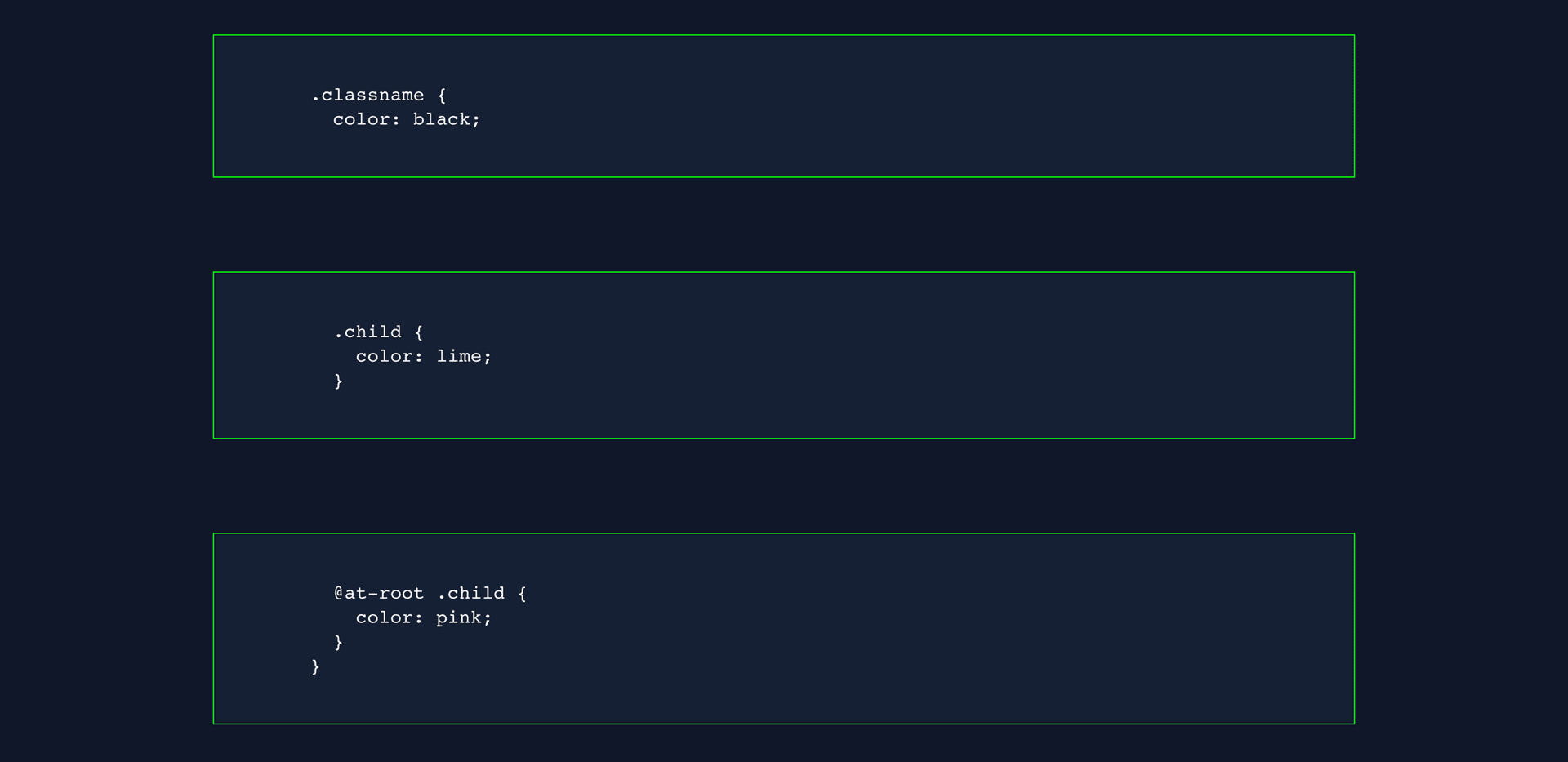
Fortunately, you can work around this with a little CSS and the adjacent sibling combinator to remove the top padding and pull the adjacent blocks upward to fill the empty gap:
.rich-code {
  $margin--small: 3rem;
  margin: (1.5 * $margin--small) (-1 * $margin--small);
  padding: $margin--small;

  & + & {
    margin-top: (-2 * $margin--small);
    padding-top: 0;
  }
}
I am by no means a fan of negative margins, but in this instance, it does the trick just fine:
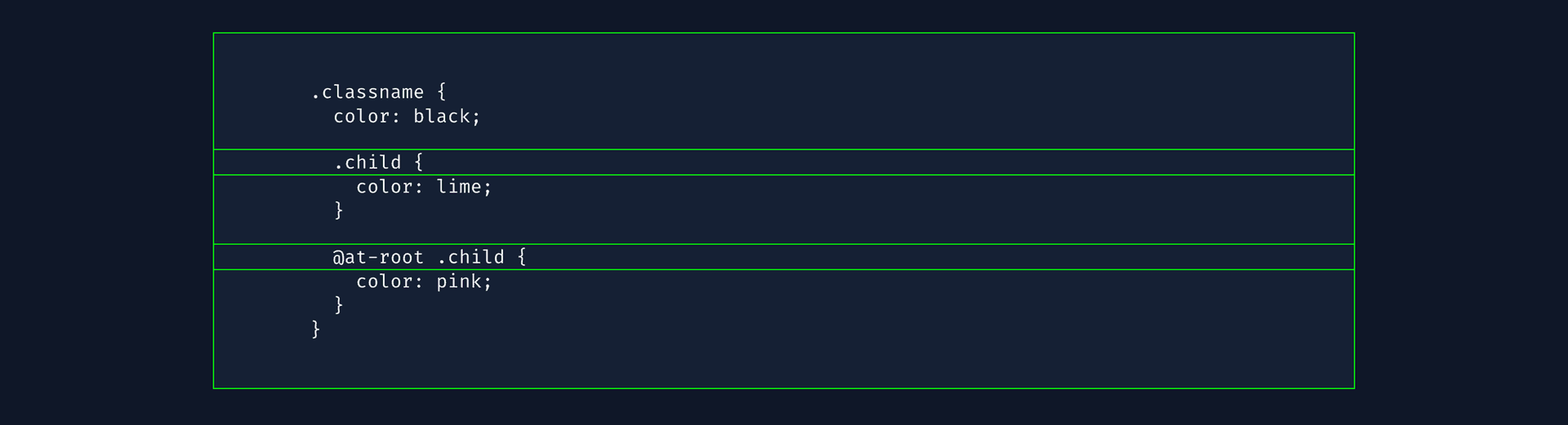
At this point, you may already have the solution you need. For me, this was a compromise that worked: it visually looked ok, but it resulted in non‑semantic markup, and individual sections within the code block would wrap at different points on narrower screens. I had to use white-space: pre-wrap to combat this, but could not do anything more interesting with my code, such as syntax‑highlight it or allow horizontal scrolling on small screens.
Combining Adjacent Snippets of Code
The final piece of this puzzle is relatively straightforward, but eventually needed the data‑transformation wizardry of my good (and very talented) friend Ben Stokoe to implement.
The transformation combines adjacent code‑only paragraphs in the content array, separating their text with \n\n. It must check the node types as well as the marks, so a code‑marked heading or an inline link is not mistaken for a code paragraph.
The final transformation code does exactly that, and looks like this:
const cloneJson = value => {
  if (Array.isArray(value)) return value.map(cloneJson);
  if (value && typeof value === 'object') {
    return Object.fromEntries(
      Object.entries(value).map(([key, child]) => [key, cloneJson(child)])
    );
  }
  return value;
};

const isCodeParagraph = node =>
  node?.nodeType === 'paragraph' &&
  node.content?.length === 1 &&
  node.content[0].nodeType === 'text' &&
  node.content[0].marks?.some(mark => mark.type === 'code');

const mergeCodeBlocks = data => {
  const mergedData = [];

  for (const original of data) {
    const current = cloneJson(original);
    const previous = mergedData[mergedData.length - 1];
    if (isCodeParagraph(previous) && isCodeParagraph(current)) {
      previous.content[0].value += '\n\n' + current.content[0].value;
    } else {
      mergedData.push(current);
    }
  }
  return mergedData;
};
Pass the content array through mergeCodeBlocks() before giving the document to documentToReactComponents(). Use the paragraph and mark renderers above. The input stays unchanged, and adjacent code paragraphs become one block in the rendered output.
Run the same pure transformation for server rendering and the first browser render. It does not need an Effect or a second state copy: doing the work only after mounting would leave the server output untransformed and change the content after hydration. If profiling shows a meaningful cost, cache the transformed result for an unchanged input.
Postscript
June 2026: this is a Gatsby‑and‑Contentful implementation note from a stack I used on several static projects. The rich‑text problem is still recognisable, but for current CMS work I would handle it as part of a broader headless CMS integration or migration review.