Testing an Angular Screen Before Switching to Zoneless Rendering

An input displays "Harbour print", but the summary underneath still says "Ceramic bowl". The form model contains the new value too. Only the interpolated text has been left behind.
That's what happened in this zoneless Angular example. Clearing the same required field made the summary refresh, which initially made the integration look healthier than it was. Changing validity supplied a notification that a valid‑to‑valid value change did not.
A migration test needs to distinguish those paths. Clicking around until the screen catches up is rather too forgiving.
Hold the Component Strategy Still
The example is a small exhibition loan register: a list of objects, a reactive description field and a catalogue selection delivered through an external callback. It runs on Angular 22.2.6, TypeScript 6.0.3, RxJS 7.8.2 and Node 22.23.4. The Zone control uses Zone.js 0.16.3.
Zoneless is the default from Angular 21. Angular 22 also defaults new components to OnPush; Eager is the name for the older strategy. Both configurations of this component explicitly select Eager. Otherwise, a comparison could quietly change the component strategy and notification mechanism together.
The two entry points select their configurations explicitly:
// zone-entry.ts
import 'zone.js';
import { boot } from './bootstrap.ts';

void boot('zone');
// zoneless-entry.ts
import { boot } from './bootstrap.ts';
void boot('zoneless');The shared boot function imports the compiler and calls bootstrapApplication with the same component and integration settings. It selects provideZoneChangeDetection() or provideZonelessChangeDetection() according to the mode. The explicit zoneless provider documents the experiment even though that mode is already the version's default.
Separate Node processes and browser pages prevent global Zone patches leaking into the zoneless run. Build metadata confirms that the zoneless bundle contains no Zone.js polyfill input, and the browser confirms there is no Zone global. Angular's own NgZone compatibility code is still present; that is a different thing.
These are minified, production‑mode just‑in‑time (JIT) diagnostic bundles, including Angular's compiler, rather than Angular CLI ahead‑of‑time (AOT) production builds. They test rendering notifications, not payload size or speed. My earlier change‑detection explanation retains its Angular 17 and Zone.js context.
Find the Updates That Were Relying on Zone
The catalogue feed uses mitt 3.0.1, an actual event emitter. Mitt invokes its listeners synchronously; a controlled RxJS asyncScheduler task supplies the simulated asynchronous delivery after 30 ms. It doesn't depend on a particular scanner or catalogue service.
Producer registration runs through NgZone.run in both configurations. That schedules inside Angular's zone in the Zone control; the zoneless configuration uses a no‑op zone. Scheduling outside Angular's zone would be a different comparison and could leave both screens stale.
The plain listener changes an ordinary field. Under the matched Zone control, the scheduled task leads to a check and the title appears. Under zoneless rendering, the field changes but the displayed title remains "Nothing selected". Calling NgZone.run has not supplied a zoneless rendering notification.
Here's what happened in each case. Each test of a missing notification starts with a fresh view, so another update can't accidentally make the stale text catch up.
| Update | Zone + Eager | Zoneless + Eager |
|---|---|---|
| Bound button adds an object | List updates | List updates |
| Asynchronous plain‑field write | Text updates | Model changes; text stays old |
| Template‑read signal changes | Text updates | Text updates |
| Observable consumed by AsyncPipe emits | Text updates | Text updates |
| Plain mitt selection listener | Title updates | Model changes; title stays old |
| Listener calls markForCheck | Title updates | Title updates |
| Listener writes a template‑read signal | Title updates | Title updates |
| Programmatic valid‑to‑valid form change, no bridge | Input and summary update | Input updates; summary stays old |
| Same form change with explicit event notification | Input and summary update | Input and summary update |
| Valid‑to‑invalid form change, no bridge | Input and summary update | Input and summary update |
These results tell us which updates reach the screen in this example. They don't tell us whether removing Zone makes it faster, or whether every part of a library will work.
Put the Notification with the Integration
There are two reasonable fixes for the catalogue example. Keep the ordinary field and mark its owning component for checking, or store the selected title in a signal that the template reads. The first is a small adaptation of an existing component; the second may fit an existing signal‑based state model.
The field‑based listener is straightforward:
readonly onSelection = (item: CatalogueItem): void => {
  this.selection = item.title;
  this.changeDetector.markForCheck();
};

// Register in the component's constructor.
this.feed.events.on('selection', this.onSelection);
this.destroyRef.onDestroy(() => {
  this.feed.events.off('selection', this.onSelection);
});
changeDetector and destroyRef are injected from this component's context. The complete example also counts callbacks so the tests can check cleanup. Removing the exact registered listener matters: a destroyed view should not keep receiving catalogue selections just because nothing renders them any more.
The signal variant uses selectionSignal.set(item.title) and reads selectionSignal() in the template. A signal that the template never reads would not establish this dependency. There is no need to convert the whole feed or every Observable to signals to solve the integration. The existing Signals article covers state and derived‑value choices in more detail.
An Updated Input is Not an Updated Template
Reactive forms have more than one route to the DOM. A programmatic control update can write the native input through its ControlValueAccessor. The separate {{ description.value }} interpolation still needs Angular to check the view.
That is why the test records three values: the FormControl model, the input's value, and the rendered summary. After a valid‑to‑valid update in the zoneless case without the bridge, the first two say "Harbour print"; the summary still says "Ceramic bowl". Asserting only on the input would miss the defect.
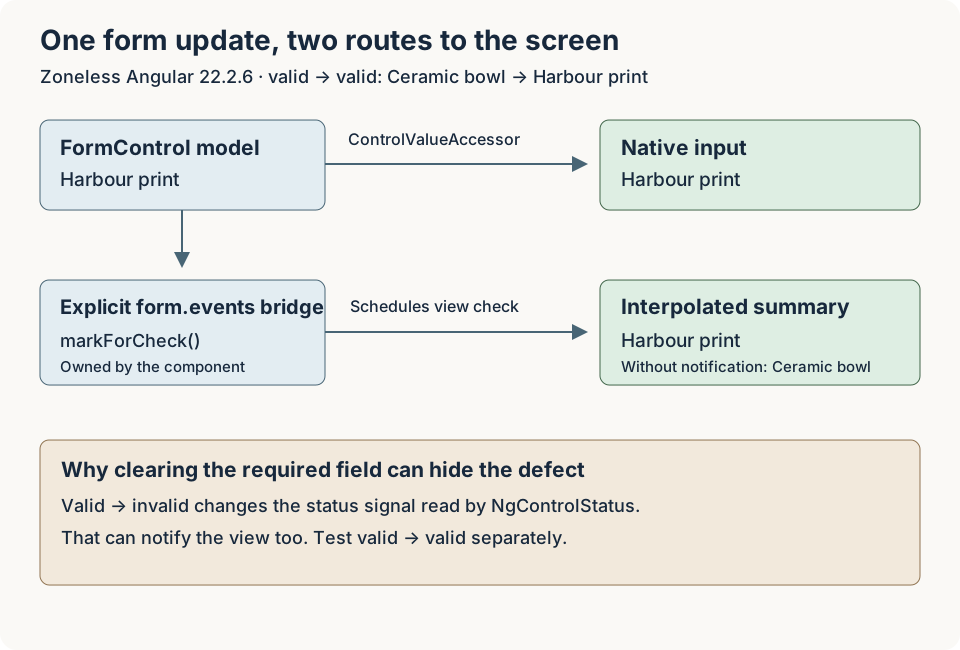
The first check nearly hid this problem. Setting the required control to an empty string changes it from valid to invalid. In the installed Angular 22 forms implementation, the control's status is backed by a signal, and NgControlStatus reads that status for host classes such as ng-valid. Changing validity can therefore notify the view and refresh the summary. A valid‑to‑valid change leaves that status unchanged.
I've kept both cases in the tests. If you only change a valid value to an invalid one, you can miss the notification problem that occurs when both values are valid.
The explicit bridge subscribes to the control's events:
this.description.events
  .pipe(takeUntilDestroyed())
  .subscribe(() => this.changeDetector.markForCheck());
This subscription is created in the constructor's injection context. It handles the events relevant to this control without assuming a single emission per change, and ends when the component is destroyed. A writer that deliberately suppresses events with emitEvent: false needs its own notification; this bridge cannot receive an event that was never emitted.
let the Test Expose a Missing Notification
Calling detectChanges() immediately after the callback would refresh the stale text and defeat this particular test. Explicit detection is useful when testing a different question about a component's state and rendering, as in the Angular testing guide. Here, scheduling is the behaviour under examination.
The fixture enables automatic detection during initial setup. For asynchronous cases, it waits for the controlled producer to complete and then awaits fixture.whenStable(). It never forces another detection pass. Waiting for Angular stability alone is insufficient when the external work has not been registered with Angular.
The suite runs 12 TestBed cases in each configuration, followed by 25 groups of checks in Chrome. The browser repeats the notification matrix, checks keyboard activation and a narrow layout, and verifies the expected Zone presence. No page errors or console warnings/errors were recorded in that run.
It's also worth checking what happens after you leave the screen. The tests destroy the component with a scheduled catalogue callback pending, wait beyond its deadline and confirm that it never runs. They then emit another catalogue selection and change the form deliberately. The removed listener and form subscription remain inactive, and AsyncPipe has released its observer.
The local source, test commands, and results include the paired results and the controls that deliberately leave stale text visible. Some of those tests expect stale text: they're there to show the failure and catch any accidental update that would hide it. You can download the zoneless comparison and tests.
Make the Migration Decision About the Actual Screen
Before switching your own screen, list where its updates come from, how each one notifies Angular, and what cleans it up. Include the actual widgets and callbacks in your application. This small emitter example doesn't tell us whether your date picker, grid, or editor will behave in the same way.
Keep the Zone build available as a rollback control until the intended paths pass. Restoring it means restoring both the polyfill import and provideZoneChangeDetection(), not changing a runtime toggle or deleting the failing tests. The fixed integrations should continue to work in that control too.
You'll need separate checks for server rendering and the other browsers you support. These Chrome tests don't cover either, and they don't compare performance. First establish that every update reaches the screen through an understood notification. Then measure whether changing the rendering setup improves the application you actually have.