Typed Vue Component Events Without Hidden Prop Mutations

A child component emits an event. Its parent receives it and updates the data. That sounds like a tidy separation of responsibilities, until the child has already changed the same data through an object prop.
The event still fires. The handler still runs. A test that only checks whether something was emitted can pass quite happily. The missing question is whether the parent was actually allowed to say no.
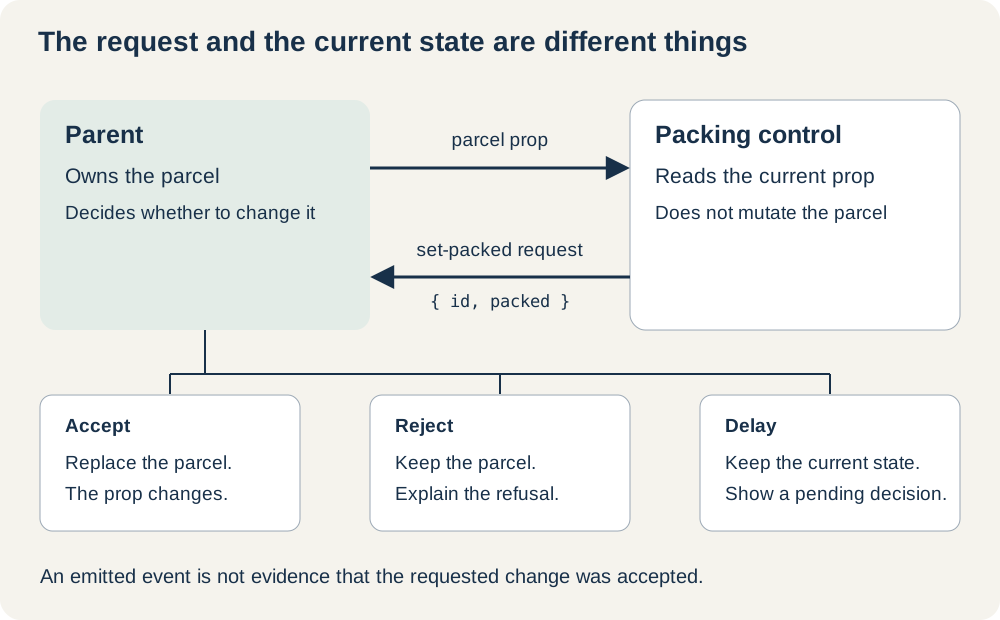
For a packing control, I'd make the child request a particular state, then display whatever state the parent supplies. The request carries an identifier and a boolean. Acceptance happens in the parent, and the child doesn't write to the parcel at all.
The Write Hidden Inside the Checkbox
Consider this deliberately broken fragment inside a component receiving a mutable parcel object:
<input
  type="checkbox"
  v-model="parcel.packing.packed"
  @change="emit('changed')"
/>
v-model writes to parcel.packing.packed. The object came from the parent, so the child has changed shared data before the parent decides what to do with changed.
Vue's one‑way prop binding doesn't make every nested object immutable. Vue prevents reassignment of the prop binding, but nested objects and arrays are still shared references. The reactivity machinery can detect a write without making that write a good design decision.
There are two useful failures to reproduce. If the parent refuses the event, the nested value has already changed. If the parent interprets the event as "toggle this parcel" and inverts the value again, the value returns to where it started.
In the accompanying Vue 3.5.45 example, a real Chrome click reproduced that second failure: the parent data and checkbox ended up false again. Vue Test Utils' setValue(true) in JSDOM produced a different visible result, leaving the checkbox checked whilst the data was false. Both tests exposed the shared write. The difference is also a good reason to check the real control in a browser before describing its behaviour.
Give the Child a Small, Explicit Request
The working version uses a toggle button. Its pressed state comes entirely from the parcel prop, so a refused request doesn't require undoing a native checkbox change.
The types describe the data the child may read and the request it may send:
export type Parcel = Readonly<{
  id: string;
  label: string;
  packing: Readonly<{ packed: boolean }>;
}>;

export type PackingRequest = Readonly<{
  id: string;
  packed: boolean;
}>;
The nested Readonly is deliberate. Making only the outer object readonly wouldn't prevent a typed assignment to packing.packed. These types help during development; they don't freeze objects at runtime or validate data arriving from elsewhere.
Here is the complete child component:
<script setup lang="ts">
import type { Parcel, PackingRequest } from './model';

const props = defineProps<{ parcel: Parcel; pending?: boolean }>();
const emit = defineEmits<{
  'set-packed': [request: PackingRequest];
}>();

const requestChange = () => {
  if (props.pending) return;
  emit('set-packed', {
    id: props.parcel.id,
    packed: !props.parcel.packing.packed,
  });
};
</script>

<template>
  <button
    type="button"
    :aria-pressed="parcel.packing.packed"
    :aria-disabled="Boolean(pending)"
    @click="requestChange"
  >
    Packed: {{ parcel.label }}
  </button>
</template>
The typed defineEmits declaration gives the event a name and a payload shape. Sending an unknown event, omitting packed, or supplying a string instead of a boolean fails the type check against this component's generated event type.
Each activation creates a fresh object containing primitive values. Sending the whole parcel would unnecessarily expose a reference to parent‑owned data. Here the parent receives "set Workshop order to packed", rather than a reference that either side might later modify.
The button keeps the same accessible name as its pressed state changes. type="button" prevents it from submitting a surrounding form. Whilst a decision is pending, aria-disabled communicates that the action is unavailable without removing the focused button. It doesn't disable anything by itself, which is why the click handler has a guard.
Acceptance Belongs in the Parent
The parent listens directly to the child:
<ParcelButton
  :parcel="parcel"
  :pending="pending.has(parcel.id)"
  @set-packed="requestPacking"
/>
Vue component events don't bubble. This listener belongs on the component emitting the event; a distant ancestor won't receive it automatically.
Once the parent accepts a request, this helper replaces only the affected parcel:
export const setPacked = (
  parcels: readonly Parcel[],
  request: PackingRequest,
): readonly Parcel[] => {
  const current = parcels.find(parcel => parcel.id === request.id);
  if (!current || current.packing.packed === request.packed) return parcels;

  return parcels.map(parcel => parcel.id === request.id
    ? { ...parcel, packing: { ...parcel.packing, packed: request.packed } }
    : parcel);
};
The parent stores the array in a shallowRef and assigns the returned array after acceptance. Unaffected parcels retain their references. The previous parcel and its nested packing object remain unchanged, making the write straightforward to inspect and test.
Setting an already packed parcel to true returns the existing array. Repeating the same desired state therefore doesn't invert the value a second time. That is a property of this local update function, not a promise of idempotent server processing.
The complete local example includes a parent with accept, reject, and held‑decision modes. It records pending parcel identifiers before awaiting a decision and refuses another request for the same parcel whilst one is outstanding. This parent guard matters even though the child also checks its pending prop: the parent owns the operation and must protect it itself. You can download the typed Vue events example.
During a held decision, the button continues to display the old accepted state. Acceptance replaces the parcel; rejection leaves it alone. A persistent status element reports the completed outcome, whilst ordinary nearby text explains that the decision is pending. Two parcels can have separate decisions outstanding.
The example holds a local promise open to let you try accepting or rejecting the change. It doesn't send a server request. A real persistence operation would also need error handling and a decision about concurrent edits. Nor should the child await emit(...) as though it receives the parent's eventual acceptance: the event announces a request, and the updated prop communicates the resulting state.
Test the Refusal, Too
The first component test mounts the actual child with a frozen parcel and frozen nested object. After a click, its central assertions are:
assert.deepEqual(wrapper.emitted('set-packed'), [
  [{ id: 'workshop', packed: true }],
]);
assert.equal(parcel.packing.packed, false);
assert.equal(wrapper.get('button').attributes('aria-pressed'), 'false');
The argument arrays are the shape returned by Vue Test Utils' event inspection. The last assertion is intentional: this test hasn't supplied an accepting parent, so emitting the request mustn't change the displayed state.
Freezing the test data catches accidental writes, but we also need to see what happens when a parent responds. The mounted parent tests check acceptance, refusal, and delayed decisions with ordinary objects. They verify reference preservation, exact payloads, and the other parcel's unchanged state. Repeated activation during a held decision produces no second request.
The suite runs eight correctness groups with Vue Test Utils 2.6.0 and JSDOM 26.1.0, alongside the component type checks. Separate Chrome tests exercise keyboard activation, focus retention, accepted and refused decisions, two pending parcels, and the surrounding form's submission count. Browser checks supplement the component tests; they don't stand in for testing screen‑reader announcements.
If you're starting with the tooling, the existing guide to testing Vue components covers mounting and assertions in more detail. The important addition here is the parent‑child interaction. An emitted event on its own proves very little about who changed the data.
Where Component v‑model Fits
For an ordinary value editor whose parent accepts each change immediately, component v-model and defineModel can make the binding pleasantly concise. The model uses a prop and an update event; it isn't permission to mutate an unrelated nested prop.
I'd keep the named request in this example because refusal and delay are part of the component's behaviour. The parent needs to decide, and the button needs to keep displaying the accepted value until it does. That policy should remain visible in the code.
Broader questions about where composable state lives belong with Composition API patterns and pitfalls. For this small control, try refusing its request. Nothing should have secretly changed.