Creating a Discernible Name for Icon Links

Having a discernible name for each link within your site is absolutely crucial for accessibility; without them, your links are ‑ for all intents and purposes ‑ entirely blank for your visitors using assistive technologies such as screen readers.
Usually, this is very simple and needs no input from the developer at all: a link will inherit its accessible name from the text content within it. For example, the link below would read 'Back to blog':
<a href="https://johnkavanagh.co.uk/writing/">
  Back to blog
</a>
Links Without Text Content
Where the complications arise, is when your link contains no notable text; for example, a link that just contains an icon or an image. In these instances, Lighthouse will raise it as an issue titled 'Links do not have a discernible name', and ding your accessibility rating:
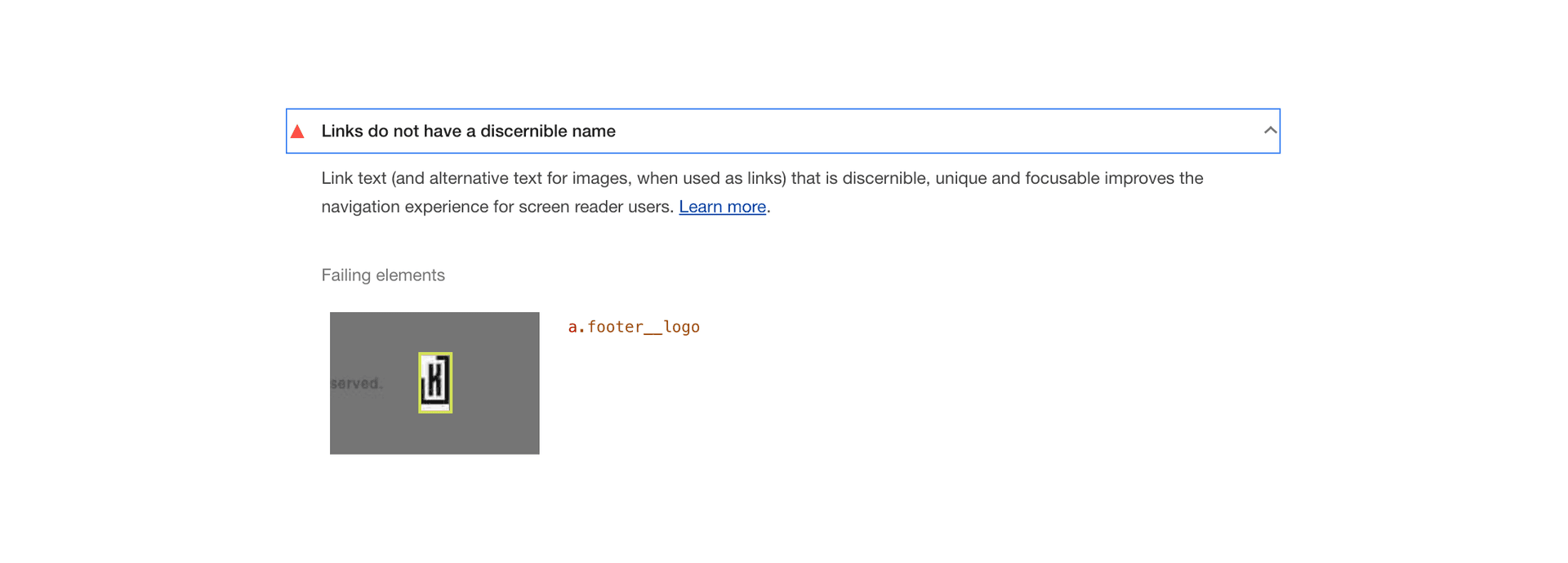
Google tends to be very good at explaining these things simply:
“Link text (and alternative text for images, when used as links) that is discernible, unique and focusable improves the navigation experience for screen reader users.
A11y will of course raise a very similar issue. So what you need to do, is add a name to your link. Easy.
Links with Just Images
A common cause of this issue is an image‑only link without useful alt text. An informative or functional image needs an appropriate text alternative; a decorative image alongside meaningful link text normally needs alt="" instead.
If a link contains only an image, its alt text should describe the destination or action of the link:
<a href="https://johnkavanagh.co.uk/writing/">
  <img src="/back-button.gif" alt="Back to blog" />
</a>
alt text supplies the link's purpose to visitors using assistive technology and remains available when the image does not load. It should describe the action or destination rather than repeat the image's appearance, and the alt attribute should never be used for keyword‑stuffing.
Links That Just Contain SVGs
As above, if your link contains just an SVG, then you need to find a way of adding textual data to it. There are two ways of embedding SVGs, the first is via img, in which case you can simply use alt as described above:
<a href="https://johnkavanagh.co.uk/writing/">
  <img src="/back-button.svg" alt="Back to blog" role="img" />
</a>
At the time this article was published, role="img" was a compatibility workaround for a Safari VoiceOver bug that could skip an img whose source was an SVG. The valid role is img, not image. This is historical platform context rather than a general requirement for img elements.
The other way of embedding SVG is directly into the markup, most commonly via something like svg‑react‑loader. This allows you to import SVGs as a React component and then use inline:
import BackButton from '../../assets/back-button.svg';

return (
  <a aria-label='Back to blog' href='https://johnkavanagh.co.uk/writing/'>
    <BackButton aria-hidden='true' focusable='false' />
  </a>
);
For an inline SVG inside an icon‑only link, name the link itself and add aria-hidden="true" to the decorative SVG. This keeps the link's purpose independent of how a browser exposes the SVG's internal title:
<svg aria-hidden="true" focusable="false" xmlns="http://www.w3.org/2000/svg" viewBox="0 0 309.72 524.31">
  <!-- the rest of the SVG... -->
</svg>
Links with No Content at All
Where a visible label is not practical and a link has no text content, aria-label can name the anchor. Visible link text is generally more robust and easier to maintain, so this should be an exception rather than the default:
<a
  href="https://johnkavanagh.co.uk/writing/"
  aria-label="Back to blog"
></a>
An SVG title can name an SVG that is itself an image, but it is not mandatory for a decorative SVG and it is not a substitute for aria-label or visible text on the parent link. The required name belongs to the interactive element.
Links with Non‑Textual Content
Similar to the above, you may be using something like Font Awesome to display webfont‑based icons within a link. Coincidentally, this is also not an approach I necessarily recommend any longer. In this instance, the solution is the same as above: add an aria-label attribute to the anchor:
<a
  href="https://johnkavanagh.co.uk/writing/"
  aria-label="Back to blog"
>
  <i aria-hidden="true" class="fad fa-long-arrow-alt-left"></i>
</a>
Fin.