Evaluating Micro‑Frontends Against a Modular Monolith

After the rollback, a new tab shows programme notes v1. The tab already open on the desk still shows v1.1, with its filter intact. Both are behaving as designed.
That is one of the more useful things to establish before choosing micro‑frontends. Changing a release pointer can determine what loads next. It cannot recall JavaScript that is already running in somebody's browser.
For this comparison, I built a fictional community‑radio desk twice. The shell contains the schedule; a programme‑notes feature reads two programmes from a local HTTP endpoint and lets the reader filter them. One application includes the feature as a local module. The other loads a separately built remote through webpack's Module Federation. Both use the same React component and return the same notes.
What I want to establish is whether separate releases are worth the extra coordination between the shell and the feature. A modular monolith here means one releasable front‑end application with clear internal modules. It does not mean one enormous JavaScript file, one owner for every feature, or an inability to lazy‑load code.
Give Independence a Specific Job
Suppose a programme team needs to update its notes feature independently of the schedule team. That's the requirement we're trying out with this fictional station.
Before distributing the application, I would want the team to identify what stops it releasing the feature in the modular version. A shared repository, unclear review responsibility and a shared deployment are different constraints. Moving code into a remote will not decide who supports the complete desk when something fails.
The ownership‑boundary discussion provides the organisational starting point: authority needs to meet responsibility for the outcome. Here the shell owns navigation and the loading fallback. The notes owner must supply a compatible module and retain a usable previous release. Somebody still owns the journey across both.
Start with the Same Feature
The example uses webpack 5.112.2, React and React DOM 19.3.1, and TypeScript 6.0.3. A small esbuild 0.25.12 loader transforms TypeScript and JSX; a separate strict TypeScript check validates it. Federation is webpack's built‑in implementation, without an enhanced federation runtime layered over it.
The local and remote versions share this boundary:
type NotesContext = Readonly<{
  stationLabel: string;
  readNotes: (signal: AbortSignal) => Promise<Programme[]>;
}>;

type NotesModule = {
  apiVersion: 1;
  release: string;
  mount: (element: HTMLElement, context: NotesContext) => {
    unmount: () => void;
  };
};
The context supplies a presentation label and a narrow read capability. The feature owns its local filter, request lifetime and styles. Its unmount aborts the read, removes its online‑event listener, unmounts the React root and removes the style element. Calling it again is harmless.
The baseline loads that module with import(). The federated shell initialises the shared scope, initialises the selected container, then obtains and evaluates its ./Notes factory. These are the container‑loading steps described by webpack.
TypeScript cannot validate a separately supplied runtime object on its own. The shell checks the module's API version, release label and mount function before using it. That catches a contract mismatch; it does not make the remote untrusted code that is safe to execute. Its module has already been evaluated by this point.
Change the Release, Then Inspect What Changed
Version v1.1 adds a short desk note about checking pronunciations with the presenter. It keeps API v1. I built that change both as an updated modular application and as a new remote.
The modular application's vendor chunk stayed byte‑identical at 218,377 uncompressed bytes. Its shell implementation chunk also stayed identical. The feature chunk, entry runtime and HTML changed. Both builds use the same webpack runtime name, so a renamed application does not distort the comparison.
That is already a useful degree of separation. Rebuilding a modular application does not imply that every dependency changed or that every visitor must download every byte again. These file comparisons are not measurements of a production cache or compressed network transfer.
The remote release consists of a new container entry and feature chunk in its own version directory. The shell can select it through a small pointer:
{
  "release": "v1.1",
  "container": "radio_notes_v1_1",
  "entry": "/releases/v1_1/remoteEntry.js"
}
The pointer is served with Cache-Control: no-store. Versioned JavaScript uses public, max-age=31536000, immutable. Each remote release has a distinct container name and output.uniqueName, because old and new releases can be loaded in the same tab.
All versions are built before the release exercise. Selecting v1.1 and then rolling back to v1 changes only the local pointer; all 33 compiled files retain their hashes. No shell rebuild or external deployment occurs during those steps. That lets us try an independent release and rollback locally. It doesn't tell us how a production release pipeline would behave or how long its builds would take.
Rollback Needs an Open‑Tab Policy
The browser checks distinguish three outcomes:
| After the pointer returns to v1 | Observed behaviour |
|---|---|
| Tab already displaying v1.1 | Keeps v1.1 and its filter |
| Newly opened tab | Loads v1 |
| Existing tab after Reload feature | Mounts v1 and resets the filter |
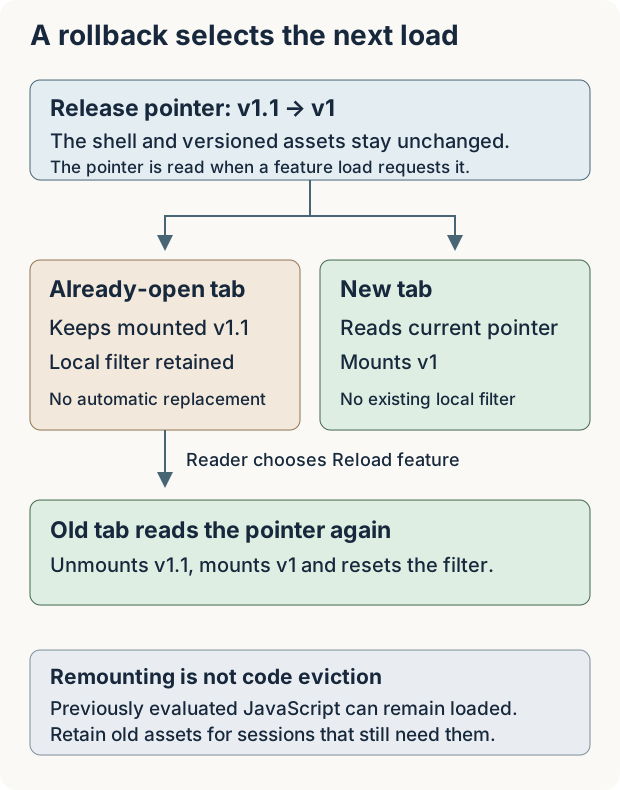
Reload feature unmounts the current feature, reads the pointer again and mounts the selected module. This example contains only a local filter, so resetting it is an acceptable, visible cost. If this were a form with unsaved edits, we'd need to decide when it's safe to replace it without losing someone's work.
Previously evaluated modules can remain in the page's JavaScript environment after remounting. A rollback pointer is therefore not a mechanism for revoking compromised code from every open session. Keep that distinction separate from whether the next feature load selects a healthy release.
The immutable URL policy also has an operational consequence: keep the old entry and chunks available for sessions that still refer to them. Replacing bytes at the old URL would break the promise the cache header makes. A real hosting setup needs its own retention and cache tests; these local tests don't tell us how your CDN or every browser cache will behave.
try an Incompatible Release
An API‑v2 remote fails the shell's API‑v1 check before mounting. A valid remote also fails if its reported release differs from the pointer's label. The shell keeps Schedule navigation and offers Reload feature, so the reader can recover after the pointer is corrected.
Shared dependencies have their own agreement. The remotes consume React through configuration equivalent to:
react: {
  singleton: true,
  strictVersion: true,
  requiredVersion: '19.3.1',
  import: false,
}
The shell supplies the installed version. The deliberately incompatible remote requires ^18.0.0 instead. Actual webpack execution rejects the available 19.3.1 singleton before the feature mounts. That failure comes from webpack's federation runtime.
As the sharing options document, singleton controls instance selection; it does not by itself provide strict compatibility rejection. The required range and strictVersion matter. import: false means this consumer has no local fallback copy to supply.
Sharing avoids one form of duplication, but it leaves the teams with a framework compatibility decision to coordinate. Centralising shared components has a similar ownership question: decide what the shared layer promises and who can change that promise.
Missing remote entries and missing dependent chunks are separate HTTP‑failure tests. Both leave navigation usable, and both recover through the same‑page Reload action once the resource is available. Navigation away during a delayed entry load increments a generation token; its eventual completion cannot mount the obsolete feature over the schedule.
The shell recovers from those particular failures. Remote code can still block the main thread, change shared globals, or damage the shell once it runs.
What the Remote Can Still Change
A test remote deliberately includes a global h1 rule, which changes the shell heading's colour. The working remote prefixes its selectors with .radio-notes, leaving that heading unchanged. Removing the feature removes its injected styles. This is an enforceable coding convention with a regression test, not a security boundary.
Identity has a similar distinction. Changing the client‑side presentation label to suggest an authorised editor still produces HTTP 403 when the server sees the viewer fixture session. Changing the actual synthetic session allows the read to succeed, and the mounted Retry notes read button retains focus.
The example uses fixed HttpOnly cookies to simulate sessions. It doesn't include a production login system. Passing a narrow function instead of a raw credential improves the integration contract, but same‑window remote JavaScript still runs as trusted page code. It can use the page's ordinary capabilities. Splitting its build does not sandbox it.
I kept the eight build manifests and results from 18 groups of Chrome tests, including keyboard navigation, hash‑history Back/Forward, skip navigation, cleanup and a 390px layout. Hash‑history coverage is not back/forward‑cache verification, and automated accessibility checks do not establish screen‑reader speech. You can download the modular and federated examples.
Decide Whether the Separate Release is Worth It
For a desk with one release owner and no demonstrated scheduling conflict, I would keep the modular application. It already has a separate feature implementation, lazy loading and unchanged vendor output across the small update. The experiment supplies no evidence that distributing it would improve build time or team productivity.
For a separate notes team, the remote could be worthwhile if selecting its release without rebuilding the shell removes something that regularly holds up delivery. Accepting that option also means owning compatibility tests, retained assets, loading recovery and the policy for already‑open sessions.
Write down those reasons in an architecture decision record, and come back to them once the teams have used the arrangement. Check whether separate releases are removing the delays you started with, or whether people are now waiting on compatibility work instead. That's a more useful basis for keeping the remote than the fact that it loads successfully.