Static Site Generators

I've actually written about static site generators before, but that was a little over a year ago and (as I touch on in this article) this is an area of web development which ‑ although by no means new ‑ is currently going through significant and continuing change. It is also a subject I am vested into so there's no harm in re‑walking previous grounds...
It is fair to say that web development has always been a fast‑evolving, and fast‑moving industry ‑ although some of the tech stacks I have worked with in the past would seem to suggest very much the opposite (!). It seems like every single week there is a new front‑end framework to learn, hotly‑anticipated CSS rules being released, new 'standard' approaches to building page layouts, and another wave of hit pieces being written about PHP ‑ everybody's favourite ever‑dependent punching bag.
Most of the technologies that have their moment in the spotlight are overtaken by new trends or are destined to become buzzwords banded about by agency people and recruiters, but some of them have enough staying power to cement themselves into the landscape.
Back in the murky depths of 2015 and 2016, there was a new trend on the rise in the world of web development ‑ one that's only grown in complexity, capability, and popularity ever since. However, this particular trend had been in the making for a lot longer than most ‑ being developed by a surprisingly wide community of talent for over a decade before it really exploded into the mainstream development zeitgeist.
That trend was static sites, and today we'll be looking at the static site generators that create them.
How Do Static Site Generators Work?
Static site generators are a bit of an odd technology, given the direction that web development has been heading in. Instead of focusing on back‑end‑based logic to build pages when a visitor reaches your site, or relying on Node.js, React, or any other flavour of JavaScript to put together a web app, SSGs actually feel like a step backwards in terms of complexity on the user‑facing side.
A static site is exactly what it sounds like: a static collection of image assets, JavaScript, CSS, and HTML files. When a user requests a page, they get served the relevant HTML file, along with any other assets that the page calls out to. Exactly like you might have developed in your very first 'web development' class ‑ quite literally web development 101 (to lean on an Americanism).
The complexity comes on the build side, rather than the user side. This comes with a bevy of benefits for developers and site owners (which we will get into in just a second, after we look at how a static site works).
Obviously, each SSG works in a slightly different way but the main idea behind them is all the same ‑ and it's a very familiar workflow to anyone who's worked with content management systems before. You build out templates with dynamic tags and logic to handle and work with data, which can be stored in databases, or files (like markdown), or even external sources like headless CMSes.
This is different from dynamic sites, wherein the building gets done after a visitor requests the page (making a request to the server), being routed to a file which then goes on to request the necessary data for the page, sticks it into the templates and layouts that you've built, and finally renders and returns that back to the browser.
So What are the Benefits of a Static Site Anyway?
1. Speed
The benefits of the way static site generators work are a big part of their appeal; probably the biggest of these benefits ‑ particularly for developers trying to sell the idea to owners ‑ is speed. Prebuilding removes request‑time page rendering and can make caching straightforward, but it does not make every static site fast: asset weight, client‑side JavaScript, caching and delivery still matter.
As you are probably already aware, speed is a big deal on the web. As you can see in this Nielsen Norman Group article about site speed across the web, some of the biggest players in our industry have reported lower conversion rates and more abandoned visits as load times increase. The impact of page speed came up in my interview and was a key focus of the optimisation work I undertook with John Lewis a few years ago.
It is no secret that a lot of WordPress and other CMSes have their fair share of sluggish load times. Thankfully, with a static site, your users can skip the wait times and get to the content that you're serving to them quicker.
2. Security
Serving prebuilt HTML and static assets can reduce the public attack surface by removing a request‑time application and database from that path. It does not make a site inherently secure: build dependencies, deployment credentials, forms, client‑side code and connected services still need the same care.
3. Easy on Hosting
Although perhaps a lesser point compared to the last two, this is still a handy one. With so many hosting packages out there now, each with their own limitations and requirements, it is nice to be able to go back to basics. You can host a static site on virtually anything, even going without a server altogether and popping it directly onto a Content Delivery Network.
Static files can be served by a simple web server, object store or content delivery network, often with less origin processing than a dynamically rendered site. That can improve capacity and cost, but it does not remove outage or cost risks from traffic, cache misses, builds, delivery infrastructure or third‑party services.
The Downsides
1. The Clue in the Name
The prebuilt pages are static, but the delivered site can still provide client‑side interaction, fetch recommendations, submit forms or load comments. Any trusted or persistent processing still needs a server, function or service somewhere; it need not be part of the page‑rendering origin.
It is a big downside and does mean that static sites tend to be more suitable for set‑and‑forget type developments where that type of functionality is less important. There are plenty of clever solutions like the solution that Eduardo Bouças came up with for his Jekyll setup, Staticman, an ingenious piece of technical work that he's written about here.
This is largely the only downside for technical users, but for non‑technical (or less‑technical) users, there's another...
2. Not as Friendly for Non‑Developers and Content Creators
A static site generator does not by itself provide an editor. Content can live in files, a co‑located content system or a remotely hosted headless CMS; keeping it in a separate service is a deployment choice rather than an inherent requirement. I've talked about headless CMSes in much more detail before.
If you're not comfortable creating markdown files and running the build commands, it's going to be difficult to work with a static site ‑ and certainly much less convenient than working with a nice UI like WordPress or the countless other CMSes out there.
Whilst this problem is getting a little less pressing (services like Contentful provide a decent back‑end for non‑technical users), it's still definitely something to bear in mind. If your project doesn't have the resources for a developer to work on getting this connection between CMS and SSG set up and maintained, or doesn't have users comfortable with generating content straight into markdown files, a static site generator might not be your best bet.
2.1 No Instant Gratification
Sort‑of related to the point above, but also sort of not: a static site, built using content from a headless CMS and a generator like Gatsby, is a great solution to a decent chunk of my client's needs. Production changes normally wait for a build and deployment, although a preview build can show draft content before that release completes.
In one of my common project builds, they will use Contentful (or Cockpit) to enter content. When they publish this, a webhook with AWS is triggered, which starts a new build. Depending on the size and complexity of the site, that build can take a few minutes to complete. The most complex site I currently manage in this fashion has somewhere in the region of 500 pages and 11,000 images ‑ all of which need to be downloaded at build‑time, optimised, and generated into various different friendly formats and resolutions. This can take ten minutes or more.
So, a client who had ‑ until now ‑ always been able to make a tweak, see it live, change their mind, and tweak it again now has to wait ten minutes to see their changes reflect in the live site. Many dynamic sites also have a decent wait time whilst things like interim caches are flushed so this isn't always totally true. Nevertheless, it is a consideration when migrating a client away from a system that has always allowed them to make instant (or near‑instant) changes to their website.
Quickstarts of Popular Static Site Generators
Let's go through the quick setup steps of a couple of the most popular SSGs on the market at the moment. Most SSGs are very quick to set up and get running ‑ these are not going to be walls of text.
Jekyll
It feels like Jekyll has been around for nearly as long as the web has. I recall trying it out way back in 2015 ‑ nearly six years ago. However, the setup with Jekyll is so fast that it is summarised straight on its homepage.
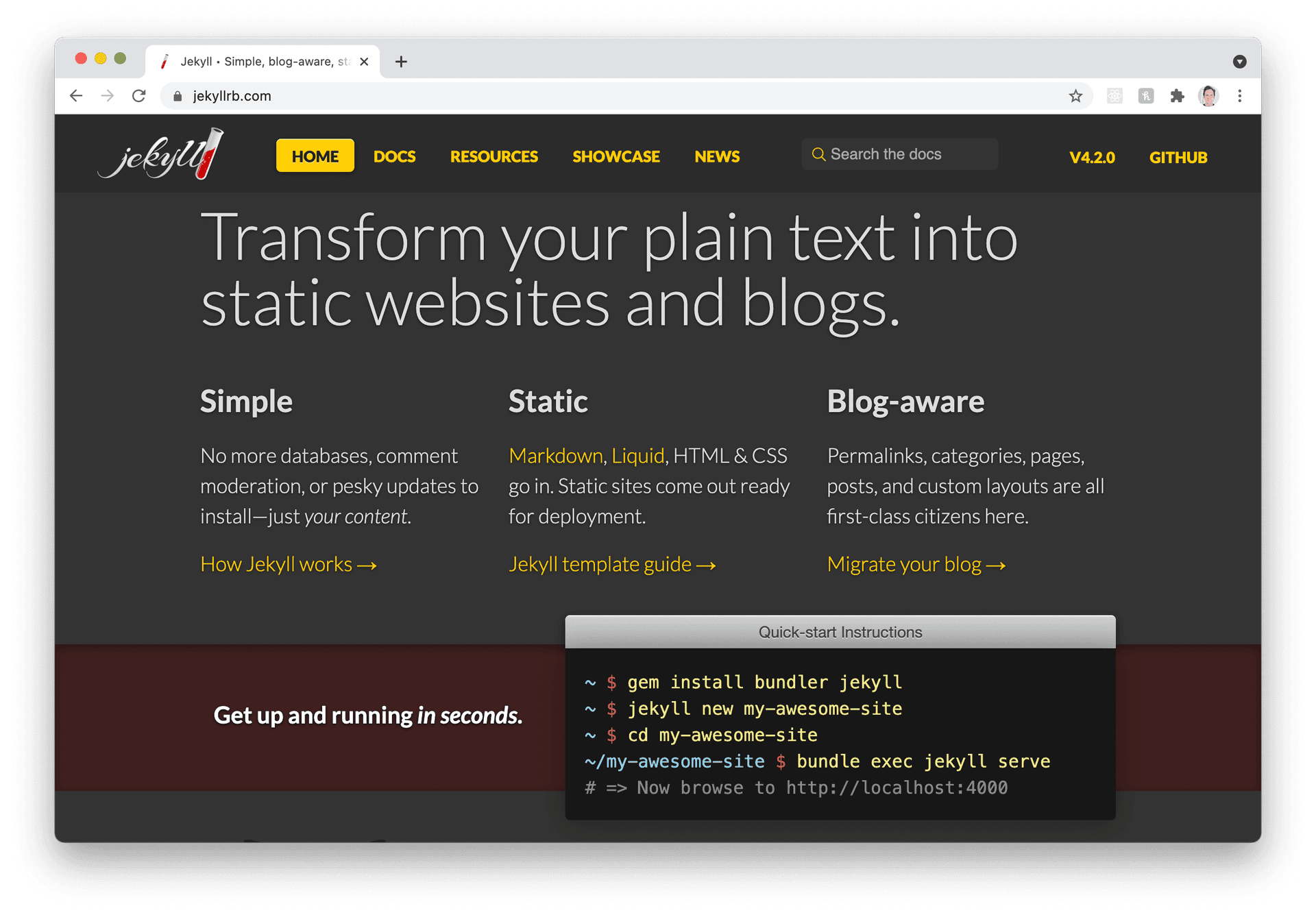
First off ‑ get Jekyll installed on your machine. To do this, all you need to do is install the Jekyll bundle via gem install bundler jekyll.
Next, create a new Jekyll project via jekyll new [PROJECT_NAME]. This creates a new directory with your chosen project name. cd into that directory, and run bundle exec jekyll serve to get your site up and running on your machine. You can then reach the front end by going to http://localhost:4000.
Gatsby
Gatsby is a seriously featureful, polished machine of an SSG. Having expanded its offering to include Gatsby Cloud (its own hosting and deployment service), as well as augmenting its standard offering to handle complex e‑commerce sites, there's plenty more to dig into with this offering than just a standard SSG.
However ‑ let's get into the setup of that fundamental SSG:
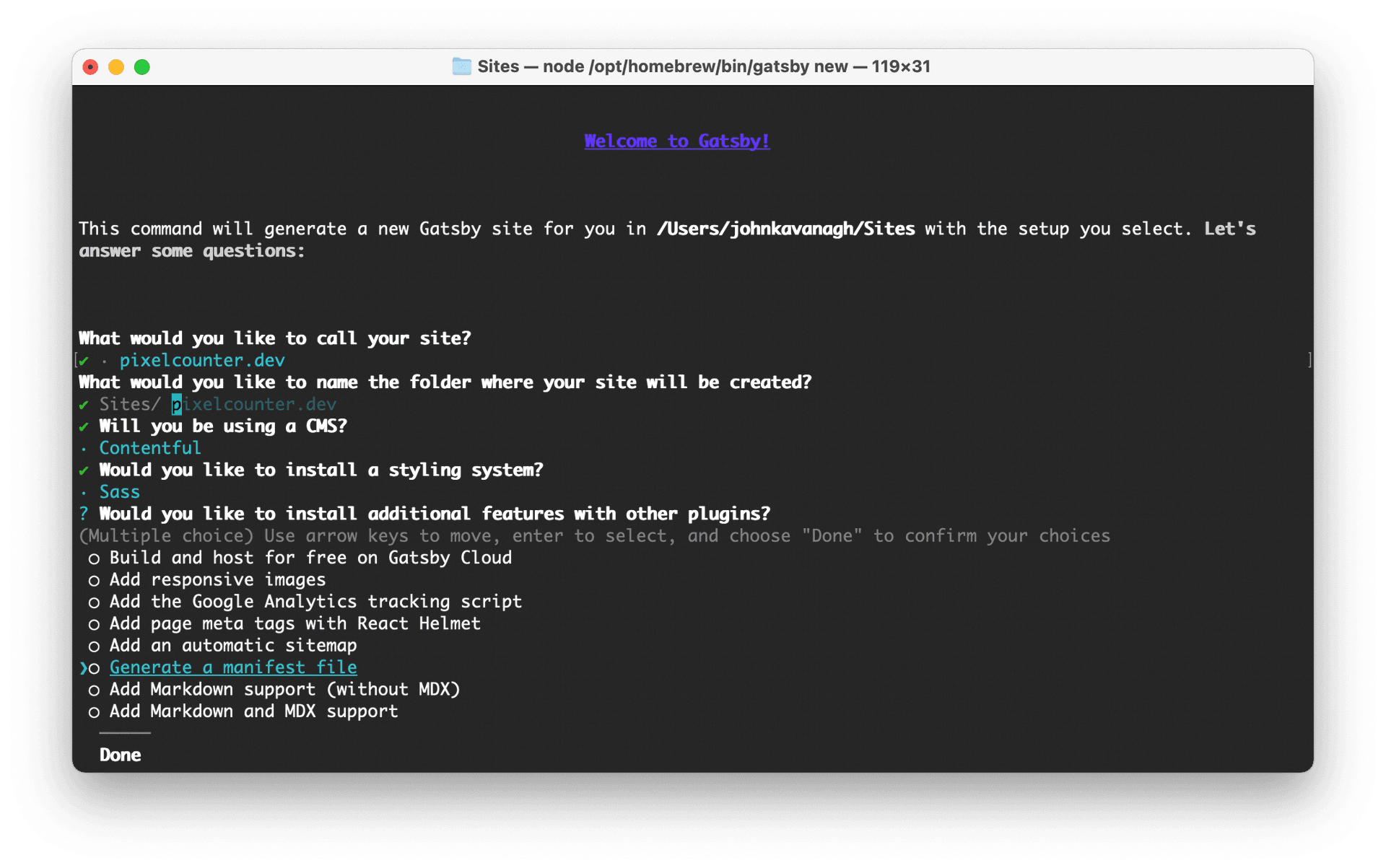
For Gatsby, you'll need Node.js on your machine to start with (although chances are high you already have it if you are a regular developer). Once that's installed you just need to run npm init gatsby to launch the Gatsby wizard, giving you the ability to pick the name for your site, the directory to put it into, and a slew of CMS options including WordPress, Shopify and Contentful.
It also offers you the chance to pick a CSS preprocessor (like Sass), which is handy! There are optional extras involved in the install process too, like responsive images, a Gatsby Cloud hosting option, analytics, and React Helmet.
Of the static site generators I've used over the years, Gatsby is the one that I return to most often. So much so that I now contribute back to the project as and when I can.
Hugo
Hugo is another great open‑source static site generator, now sponsored by the up‑and‑coming browser Brave. For smaller, and simpler sites, it is a fantastic choice. Coming with a wide variety of front‑end templates to get you up and running with styling quickly, it also features a surprisingly speedy build time.
The setup for a Hugo environment is as quick as you would expect ‑ simply run brew install hugo, followed by hugo new site [PROJECT_NAME] to get a Hugo site in a new directory right away. Move into that new directory, and run hugo server to get your development environment up and running.
From there, you can view your Hugo site at http://localhost:1313 once the server is running.
The Wrap‑up
Static site generators have come a long, long way since their inception. They can support fast sites when the assets, client‑side code, caching and delivery are engineered well. Any search benefit comes from the resulting performance and content, not from the generator label itself.
They are not perfect for every project but they are surprisingly flexible and can be applied to a wide variety of serious ventures. They are still definitely more at home handling smaller blogs or more simple company websites rather than monolith platforms where the speed would really help out, but given a few more years who knows what they will end up powering? My next freelance project is a complex e‑commerce market platform, I am still working out whether to spin up Gatsby for that one or not.
Postscript
August 2023: Netlify has announced the retirement of Gatsby Cloud, with migration paths to Netlify and end dates depending on customer contracts. The Gatsby Cloud setup option above is therefore historical, rather than a recommendation for a new deployment. This affects the hosted service, not the Gatsby JavaScript framework; the tool choices in the body describe my November 2021 setup. See Netlify's Gatsby Cloud announcement for the migration context.