Understanding Transient Props in styled-components

In Brief
Transient props in styled-components start with a dollar sign, such as $truncated. The library can use them to choose styles without forwarding them to the underlying element. That is useful for styling‑only state, particularly with v6's default prop‑forwarding behaviour.
This is an interesting one for me. At the moment, I'm working on a replatforming project for my airline client where my team and I are moving a monolithic legacy application from a combination of React, Handlebars and Java (using Emotion) to an all‑new headless, Next.js application using GraphQL and styled-components.
Because much of the existing application is already built in React, a lot of current work involves what our product owner would refer to (oversimplistically) as 'lift and shift' work, where a component gets copied from one project to another and minimally reworked in order to make it compatible with the new environment.
Last week, one of my team came to me with an interesting warning cropping up in their browser console:
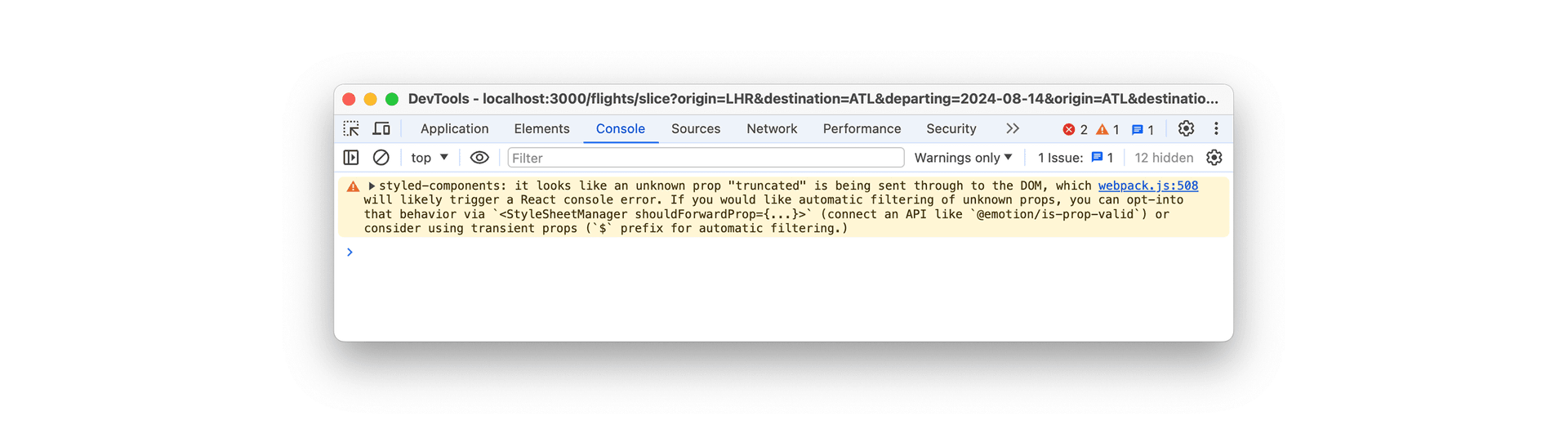
To offer a little context, they were working on a panel which truncates text based on a boolean state item, and although it's only a warning and seemingly was having no ill effects in the wider application, it was something that they didn't want going into production code (and which I agree with).
This was a styling prop being forwarded to the underlying element. The styled-components transient‑prop convention gives us a straightforward way to keep it out of the DOM.
What are/is styled-components?
Let's start at the beginning. styled-components is a library which allows us as developers to write CSS directly within our JavaScript (specifically: in React and React Native applications). It uses tagged template literals as a means to define styles at the component‑level. This results in a really modular architecture which makes management and maintenance more straightforward across larger codebases.
The biggest advantages are that the styling is scoped within the component (so no leaky styling), and ‑ as we're discussing ‑ allows us to dynamically update the styling of a component based on state or props.
Props in styled-components
You can pass values to a styled component to choose its CSS. The TypeScript example below uses styled-components v6 without a custom shouldForwardProp filter, which lets the unknown truncated prop reach React's DOM handling:
import styled from 'styled-components';

export const AccordionDrawer = styled.div<{ truncated: boolean }>`
  display: block;
  max-height: ${({ truncated }) => (truncated ? '3rem' : '100rem')};
  overflow: hidden;
  transition: max-height 0.3s ease-in-out;
`;
truncated is a boolean. When it is true, the drawer clips its content at 3rem; when it is false, its max-height is 100rem. The parent supplies that state value when it renders the drawer:
<AccordionDrawer truncated={truncated}>
  <p>Lorem ipsum dollar</p>
</AccordionDrawer>
Pretty cool, right?
The Need for Transient Props
Here, truncated is a styling detail rather than an attribute of a div. Forwarding it can produce the unknown‑prop warning shown above, and React can also warn about a boolean value on a non‑boolean attribute. This example depends on the v6 defaults: v5 filtered unknown HTML props by default, and a custom shouldForwardProp configuration can change which props reach the element.
To address this, styled-components introduced transient props.
What are Transient Props?
Transient props are prefixed with a dollar sign ($). styled-components uses that prefix to avoid forwarding the prop to the underlying element. They were introduced in v5.1.0 in May 2020.
Using Transient Props
Using transient props is quite literally as simple as prepending the dollar sign to your prop names. Going back to our earlier example, it would now look like this:
import styled from 'styled-components';

export const AccordionDrawer = styled.div<{ $truncated: boolean }>`
  display: block;
  max-height: ${({ $truncated }) => ($truncated ? '3rem' : '100rem')};
  overflow: hidden;
  transition: max-height 0.3s ease-in-out;
`;
The difference is subtle. In use it would now look like this:
<AccordionDrawer $truncated={truncated}>
  <p>Lorem ipsum dollar</p>
</AccordionDrawer>
All we have changed between these examples is truncated to $truncated. The 3rem and 100rem height values stay the same. The dollar sign tells styled-components to use the value for styling and keep it out of the underlying DOM element.
Wrapping Up
The change is small, but it makes the intent clear: this value belongs to styling, so the DOM does not need to receive it. It resolves the prop‑forwarding warning; there is no measured performance improvement to claim here.
For more details, you can check the styled-components release notes, the GitHub discussion on transient props, and the original discussion about workarounds from when this issue first arose.