Reliable WebSocket Connections in React: Reconnects, Ordering, and Cleanup
A WebSocket can reconnect successfully and still leave a screen showing the wrong information. The connection is open again, the green indicator has returned, and three updates arrived whilst the browser was away. Unless the application has a way to recover those updates, reopening the connection hasn't repaired the feed.
For a React status screen, I'd start by asking what someone looking at the screen can safely rely on. It needs one owner for the connection, a cursor identifying the last update it applied, and a server that can explain what happened after that cursor. It also needs to admit when its information is stale.
The example here follows a small build‑status feed. It retains the most recent 100 events, recovers a short interruption by replaying events, and replaces that history with a snapshot when replay is no longer available. Keeping the most recent events is enough for this activity display. If you're building an audit ledger, you can't discard older records in the same way.
An Open Connection isn't a Recovered Feed
The server assigns each event an increasing integer sequence. The sequence belongs to this one stream; it isn't a timestamp and cannot be borrowed from another tenant or subscription. The browser remembers the highest sequence it has successfully applied.
On connection, the client sends { "after": 42 }. The server either replays events after 42 or returns a snapshot if that cursor has expired. It then sends a ready frame containing the sequence through which recovery is complete.
export type Frame =
  | { kind: 'snapshot'; seq: number; items: Item[] }
  | { kind: 'event'; seq: number; label: string }
  | { kind: 'ready'; seq: number };
Item contains a sequence and a label. A snapshot is the retained window at its stated sequence, rather than a promise to include every event since the stream began. The client only calls itself live when its cursor matches the server's ready watermark. Receiving the socket's open event isn't enough.
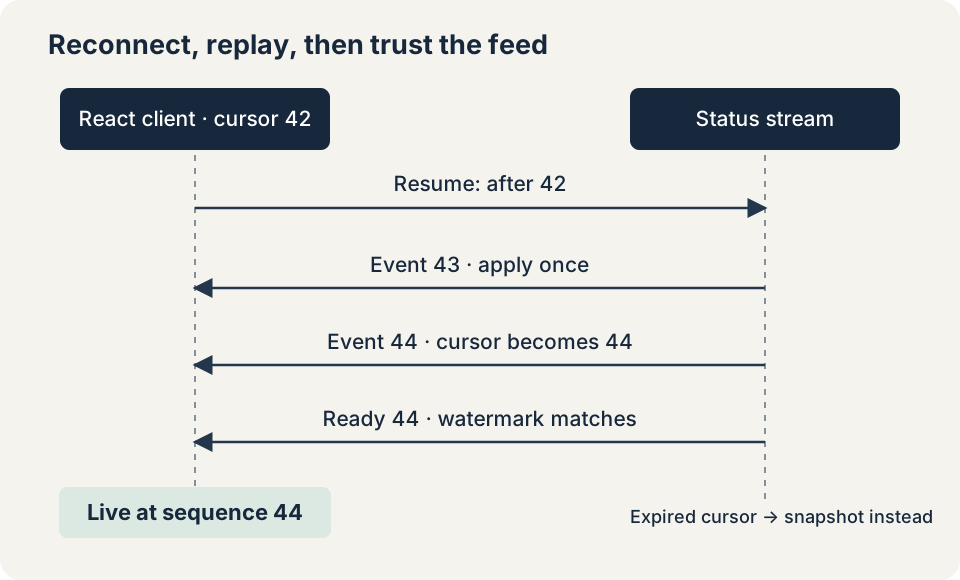
The server must establish the snapshot or replay and its subscription without a gap between them. In this single‑process example, both happen synchronously in one event‑loop turn. A distributed service needs the equivalent guarantee from its log or database. Reading a snapshot, waiting, and then subscribing leaves a window in which updates can disappear.
WebSocket already preserves order within a connection. We need these sequence checks when recovering across connections, or when our own protocol gets something wrong.
Keep the Decision About Ordering Separate from React
The feed's state transition is a pure function. That makes it possible to exercise troublesome sequences without opening a browser or waiting for a network timeout.
export const applyFrame = (view: View, frame: Frame): View => {
  if (frame.kind === 'snapshot') {
    if (frame.seq < view.cursor) throw new Error('Snapshot moved backwards');
    return { status: 'recovering', cursor: frame.seq, items: frame.items };
  }
  if (frame.kind === 'ready') {
    if (frame.seq !== view.cursor) throw new Error('Replay incomplete');
    return { ...view, status: 'live' };
  }
  if (frame.seq <= view.cursor) return view;
  if (frame.seq !== view.cursor + 1) throw new Error('Sequence gap');
  return {
    ...view,
    cursor: frame.seq,
    items: [...view.items, { seq: frame.seq, label: frame.label }].slice(-100),
  };
};
An event we've already applied does nothing. An event beyond the expected successor is rejected. Advancing straight to that larger number would erase the evidence that something is missing.
The controller catches a rejected sequence, closes the current connection, and requests a snapshot on its next attempt. The previously displayed items remain visible with a disconnected status. For this feed, a fresh retained window is an acceptable recovery. A payment history or an inventory ledger would need a different response: missing records can't quietly become irrelevant just because the client missed them.
These types describe valid frames after decoding. They don't validate a network message. The decoder in the complete example checks the frame kind, safe integer sequences, label lengths, ordered snapshot items, and a maximum snapshot length. It rejects strings longer than 65,536 UTF‑16 code units before parsing. That is JavaScript's string‑length measure, not a cap on encoded network bytes. Messages can still accumulate in the browser's receive buffer.
Give the Effect One Connection Owner
The React integration is deliberately small. It starts the controller and returns its stop function as effect cleanup.
export const useFeed = (
  url: string,
  factory: (url: string) => Socket,
): View => {
  const [view, setView] = useState<View>(initialView);
  useEffect(() => connectFeed(() => factory(url), setView), [url, factory]);
  return view;
};
Keep the factory outside the component so its identity is stable. Constructing a new factory on every render would tear down the connection and start it again whenever the effect dependencies changed.
The controller owns the cursor as well as the socket. It publishes complete view states to React, so a message callback doesn't need to read state captured by an earlier render. That removes one common source of stale closures in effects and handlers.
Every callback checks that its socket is still the controller's current socket. Cleanup marks the controller stopped, cancels its retry timer, cancels its heartbeat deadline, detaches handlers, and closes the connection. A callback already queued from an abandoned connection must fail that ownership check, even if removing the handler came too late to prevent its delivery.
React's effect documentation explains the extra setup‑and‑cleanup cycle in development Strict Mode. The test mounts this hook under Strict Mode: two sockets are created during that exercise, one remains owned afterwards, and none remain after unmount. Suppressing the extra setup would hide the lifecycle problem rather than test it. The broader reasons for cleaning up subscriptions are covered in preventing React memory leaks.
Changing the feed URL starts a new controller and therefore resets the cursor. A cursor must never leak into a different stream. Applications with several views of the same feed might put one owner in a provider or an external store; independently mounting this hook in five components deliberately creates five connections.
Retry Slowly Enough to Be Useful
After a failure, the controller schedules a capped exponential delay with jitter:
export const retryDelay = (attempt: number, random: number): number =>
  Math.round(
    Math.min(30_000, 500 * 2 ** Math.min(attempt, 10)) *
      (0.5 + random / 2),
  );
The first retry waits between 250 and 500 milliseconds. Once the cap is reached, retries wait between 15 and 30 seconds. Injecting the random value and clock lets the tests check those bounds without sleeping.
The attempt counter resets after a valid ready frame, rather than immediately on open. A server that accepts connections but never restores the feed shouldn't keep earning an immediate retry. The example stops automatic attempts after eight retries following a failure run; the last view remains disconnected. A product can offer an explicit reconnect action that remounts the owner, with wording that makes clear that the displayed events may be old.
The example also uses an application heartbeat to check that the server is still responding. The server sends ready every five seconds, and the client allows 15 seconds for a matching watermark. An initially silent connection has the same deadline. An idle stream can remain live through matching heartbeats without new events. The watermark confirms delivery through the server's current cursor, not whether an upstream build producer is still working. Browser timers can be delayed in background tabs, so this is a recovery policy, not an exact detector of when a network failed.
A real service should classify failures. Retrying an expired credential or a deliberately rejected subscription eight times isn't helpful. Refresh authentication through the application's established mechanism, and only resume a stream after authorisation succeeds. Don't put long‑lived credentials into a URL that might be logged.
Bound the Work, and Explain What Was Dropped
The browser WebSocket API has no incoming backpressure. Keeping only 100 items limits retained application history, but doesn't stop messages accumulating before JavaScript handles them. bufferedAmount reports outgoing queued bytes; it cannot tell us how far behind incoming processing has fallen.
This example disconnects if it handles more than 250 frames within its current one‑second window, then requests a snapshot. That is a deliberately simple overload policy for a low‑volume activity feed. It bounds the work accepted in that window and avoids pretending that selectively skipped events are still a continuous history. It doesn't guarantee a memory ceiling under a hostile sender, and repeated snapshots won't fix a service whose normal rate exceeds the client's capacity.
For a busy production feed, reduce the server subscription, aggregate updates, or use a protocol with explicit client demand. If the screen only needs the latest status of each build, coalescing by build identifier may be appropriate. If every transition matters, replacing transitions with a latest value changes the product's meaning.
Test the Interruptions You Expect to Survive
The example and its tests use React 19.3.1, TypeScript 6.0.3, and ws 8.22.0 on Node 22.23.4. Its deterministic tests cover duplicate events, gaps, backwards snapshots, malformed input, retry limits, stale callbacks, overload, and teardown. These tests mount the hook with React DOM, so they exercise React's effect behaviour too.
A separate loopback test asks the real server to replay a cursor and to provide a snapshot after retention expires. In the browser test, the server connection is deliberately closed and another event is added whilst it's disconnected. After reconnecting, both events appear exactly once. You'll still need to try this through your own proxies and load balancers, and on mobile browsers that may suspend the page.
The local verification project includes the complete decoder, controller, and server, alongside these excerpts. You can download the WebSocket recovery example.
For your application, keep a failure table alongside the tests:
| Interruption | Required observation |
|---|---|
| Duplicate event | The cursor and visible items stay unchanged. |
| Missing successor | The screen leaves its trusted state and resynchronises. |
| Replay no longer retained | A snapshot replaces the recent‑activity window. |
| Old socket delivers late | Its callback cannot update the new owner. |
| Component unmounts | No socket or retry remains owned by that component. |
| Server accepts but stays silent | The deadline expires and recovery remains bounded. |
The teaching server has an in‑memory log, no authentication, and no durable stream identity. Restarting it resets its sequence; the current client intentionally rejects a backwards snapshot. A deployable protocol needs persistent sequences or an explicit stream epoch and reset policy. It also needs authorised subscriptions, secure transport, server‑side output limits, and an operational way to inspect failed recovery. Those aren't details a React hook can supply on its own.
Someone looking at this screen should be able to trust what its status tells them. When it says live, it has applied everything through the last confirmed watermark. When it can't establish that, it keeps the useful history visible and says so.