Using CSS to Deal with Widows

Terminology in typesetting and typography can get confusing, especially when different people publish conflicting articles on what an 'orphan', 'runt', or 'widow' is. For the sake of consistency, I'll stick with the Wikipedia definition:
“A paragraph‑ending line that falls at the beginning of the following page or column, thus separated from the rest of the text. Mnemonically, a widow is "alone at the top" (of the family tree but, in this case, of the page or column).
For example:
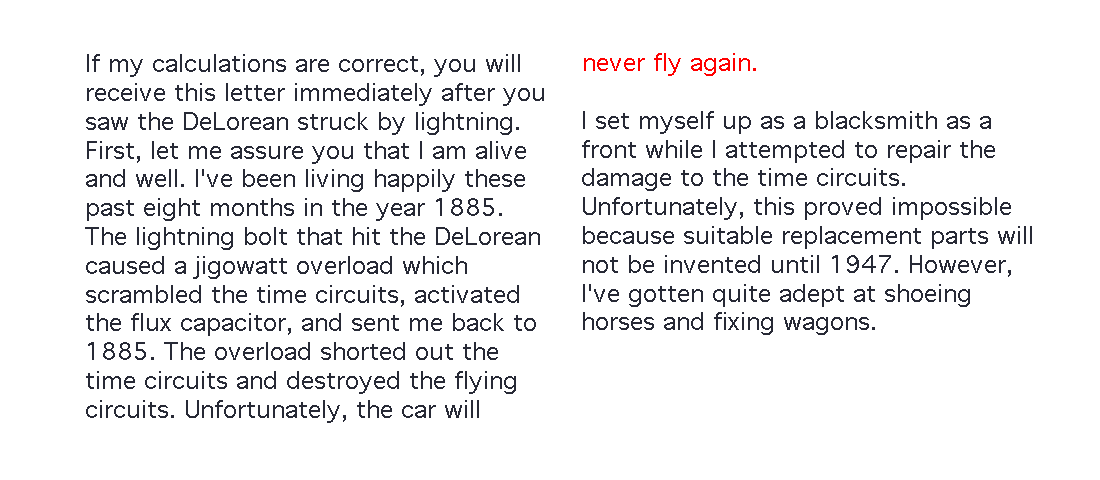
If you mean a single word left on a paragraph's final line, my article about avoiding orphans covers that separate problem. It uses a non‑breaking space between the final words, with a React span and white-space: nowrap where an explicit wrapper is useful.
For the page or column break described above, widows sets the minimum number of a paragraph's lines to keep after a break, and orphans sets the minimum before it:
p {
  widows: 2;
  orphans: 2;
}
This asks for at least two lines on each side of a paragraph break in paged or multi‑column content. It does not prevent a short final line in an ordinary scrolling page. Support and break constraints differ between fragmentation contexts, so test the browser or print engine you need. Keeping an entire block together is a separate choice: break-inside: avoid asks the browser not to split a <section> or <p>, which may move the whole block to the next page or column.
I use this very technique in the columned layout of the Terms & Conditions pages here on my own website to avoid the <section> tags breaking and ‑ potentially ‑ leaving a title stranded at the bottom of a column.
Browser implementation data is still worth checking for the fragmentation context you need. Older Firefox versions could rely on page-break-inside in paged media:
.classname {
  break-inside: avoid;
  page-break-inside: avoid;
}
The initial value is auto, which allows a break where the fragmentation algorithm otherwise chooses one. Support for avoid has varied by browser and fragmentation context, so it is not a universal line‑wrapping fix.